Wednesday, October 7, 2026ArchiveSearchAsk the paper

The Computomatix Times

All the posts fit to save — curated from @computomatix's bookmarks & likes on X

Agents & Dev Tools

Coding agents, developer tools, workflows, open source

Developer Rebuilds Seven Adobe Apps in Rust Using Opus 5.5

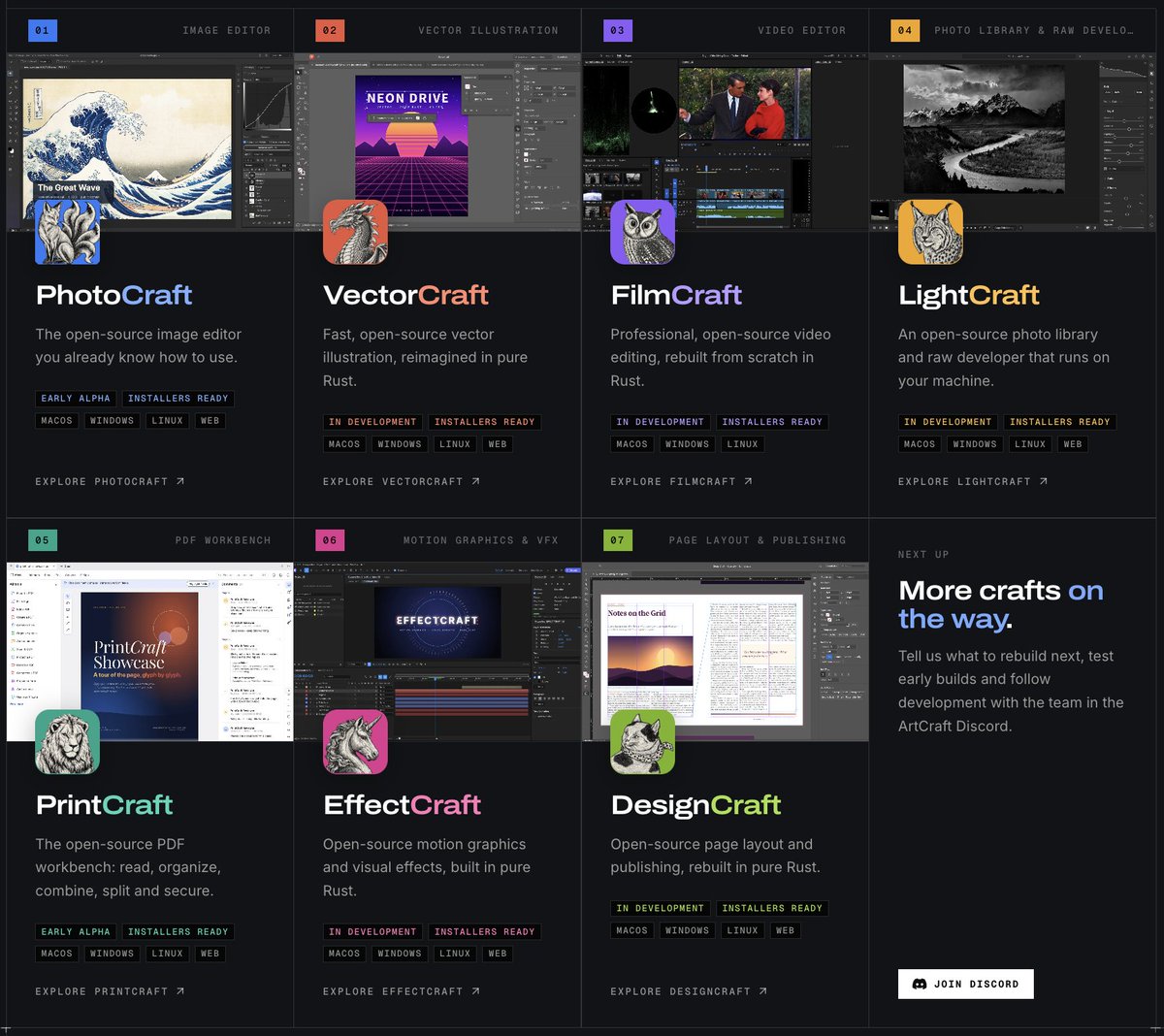
Peter Yang highlights a developer who reimplemented seven Adobe apps, including Photoshop, Premiere and Lightroom, in Rust with Claude Opus 5.5 and open-sourced them. The developer believes they can match Adobe's features within months, against Adobe's $840 yearly all-apps plan.

Original post · 1 min read
It's insane to watch AI blow apart closed source software and games.

4 examples from the past month:

1. 7 of Adobe's biggest apps, including Photoshop, Premiere, and Lightroom, have been partially rebuilt in Rust with Opus 5.5 and open sourced. It's still early, but the developer thinks they can match Adobe's features within months. Adobe's all-apps plan costs $840/year.
Miguel Ángel Durán @midudev
Todos los productos de Adobe reimplementados desde cero, gratuitos y de código abierto

→ getartcraft.com/apps
♥ 50 · ⟲ 2 · 👁 10.7KView on X ↗

Vercel's Guillermo Rauch Explains Turborepo's Migration From Go to Rust

Guillermo Rauch says Vercel moved Turborepo from Go to Rust, a migration that was controversial internally due to human costs. He argues that with AI agents the calculus has changed, so what is best for humans is no longer necessarily best for business.

Original post · 1 min read
DHH is fundamentally right about Rust. For context, Vercel has been undergoing a Rust-ification (carcinization, technically 🦀) for a while.

One of the first projects we migrated was Turborepo, from Go to Rust¹. The migration completed, but the RoI was actually quite controversial internally.

While Rust was in our eyes better for low-level OS access, something crucial for a build system like Turbo, the human migration costs were very sustantive.

Go is very fast. It's beautifully designed. It's easy to iterate on. We were very conflicted about the migration, because it was *humans* writing the code, *even if we knew Rust was a better choice*.

The calculus has now changed. What's "best for humans" is no longer necessarily "best for business".

FWIW, it's also quite unlikely that Rust is the end-all-be-all toolchain. I'm quite certain there's greener pasture ahead, because Rust itself was designed before the 'supersonic tsunami' of agents hit.

¹ https​://vercel.com/blog/how-turborepo-is-porting-from-go-to-rust
♥ 3.2K · ⟲ 152 · 👁 352.7KView on X ↗

Integer Multiplication Algorithm Bound Tightened Repeatedly With Astra

A post reports that a user running ChatGPT Astra in a loop is repeatedly breaking records for integer multiplication algorithms. It quotes an update to OpenAI problem #109 that tightens the constant from 2^-182 to 2^-59, a roughly 500,000-fold improvement over the previous result.

Original post · 1 min read
This guy has 6.1 Astra running in a loop and is breaking the record for integer multiplication algorithms every few hours lmaooooo.
Doug Colkitt @0xdoug
We are publishing an update to OpenAI problem #109 Integer multiplication) with another substantial further tightening:

κ = 2⁻⁵⁹ (from OpenAI’s original κ = 2⁻¹⁸²)

Approximately 500 thousand fold improvement over our previous result and a 2¹²³ fold improvement over the original OAI result.

The latest redesigned the finite network to share intermediate computations and scratch space, then tightened the recursion and Gaussian estimates.
♥ 4.1K · ⟲ 118 · 👁 167.4KView on X ↗

Boris Cherny Says Prompting Claude Should Feel Like Talking to a Coworker

Boris Cherny explains his approach to prompting Claude, advising users to give clear goals, specify effort level and verification steps rather than relying on heavy scaffolding.

Original post · 1 min read
I am surprised that people are surprised this is how I prompt Claude.

Talk to Claude the way you would a coworker. There's no secret to prompting. There's no need to be overly scaffolded or prescriptive for most tasks -- give Claude a goal, and it will figure it out.

Back in the Sonnet 3.5 days, your prompt mattered a lot. Nowadays, it's much more important to communicate to the model:

1. What you want it to do
2. How much effort you want it to spend
3. How it should verify that it did the right thing
Boris Cherny @bcherny
Prompt
♥ 12.1K · ⟲ 720 · 👁 1.1MView on X ↗

Eric Raymond Highlights Open-Source Rust Clone of Photoshop Built via LLM

Eric S. Raymond shares the photocraft GitHub project, a clean-room open-source reimplementation of Photoshop that he says was likely generated by decompiling the app, converting it to a spec and prompting an LLM for Rust. He argues this threatens closed-source software.

Original post · 1 min read
This is the doom I predicted a few days ago, coming for Photoshop. A clean-room open-source reimplementation.

No prizes for guessing that they decompiled Photoshop to source code, processed that to some kind of non-code specification language, then fed the spec to an LLM with an instruction to generate Rust.

Adobe just got nuked. And closed source is dead, dead, dead.

github.com/storytold/photocraft
♥ 16.2K · ⟲ 1.4K · 👁 3.7MView on X ↗

Nat Eliason Details Fourteen Ways His Bot Setup Automates Work

Nat Eliason lists fourteen functions of his bot setup, including a chief-of-staff agent that drafts emails, specialist agents per work lane, and cloud coding agents that open pull requests from Linear issues. He notes GrokBot as a substantial improvement over his previous OpenClaw setup.

Original post · 2 min read
Things my @bot setup does that still blow my mind:

1. A Chief of Staff who opens the day pulling open loops from email & tasks and suggesting things it can knock out before 7am.

2. After every meeting, decisions get folded into Notion, Linear, and Todoist — not left rotting in Granola

3. Every email starts as a draft. The CoS bot scans my email every ~2hr and drafts replies to nearly everything — including checking my cal for availability and finding requested attachments / links

4. A specialist for each lane: curriculum, engineering, coaching, hiring, content, ops, and one for every single piece of software

5. Routines that keep running while I’m offline (e.g. monitoring Sentry errors in our apps and proactively fixing things)

6. Group rooms where 2–4 bots share one project thread instead of me copy-pasting context

7. Cloud coding agents that pick up Linear issues and open PRs after running the list of open work by me EoD — then squash-merge to main when it’s done

8. Meeting prep briefs pulled from Granola + Notion before I walk in

9. A growing shareable knowledge base in Notion + a GitHub repo that we update daily based on what happens at school

10. Student progress look-up across Expertise, Followers, and CoFounder without inventing numbers — chat anytime to see where a student is on their business work

11. Mentor Mind that coaches me on how to hold the bar without inventing doctrine

12. Todoist as a central task list where it logs things it’s blocked on for me, or from meetings / emails — and I can paste links into chat to direct it how to solve them

13. Engineering work is automatically tracked in Linear so my and the product teams’ bots don’t collide with each other

14. Presentations spun up in Gamma / Claude Design without me opening a slide tool

15. Plaud / live capture → notes the bots can actually act on

Probably more but these were the immediate ones we thought of.
Nat Eliason @nateliason
GrokBot feels like absolute magic at this point, a meaningful leg up on my previous OpenClaw etc. setups.

And with how easy it is to setup, there's really no excuse now.
♥ 2.1K · ⟲ 207 · 👁 522.0KView on X ↗

Open-Source Tool Rea Uses Agents to Reverse Engineer Binaries

GitHub - morluto/rea: Reverse engineer anything with agents, from app behavior down to native binaries.

A trending-repository post highlights rea, a GitHub project that uses agents to reverse engineer applications, from observed app behavior down to native binaries. It gained 2,963 stars in the past 24 hours.

Original post · 1 min read
Trending repository of the day 📈

rea

Reverse engineer anything with agents, from app behavior down to native binaries.

Last 24h: 2,963 ⭐
Total: 6,869 ⭐️
github.com/morluto/rea
github.comGitHub - morluto/rea: Reverse engineer anything with agents, from app behavior down to native binaries.Reverse engineer anything with agents, from app behavior down to native binaries. - morluto/rea
♥ 2.7K · ⟲ 314 · 👁 135.2KView on X ↗

DHH Predicts Software Development Boom as Coding Agents Take Over

Over my dead pencil

DHH argues in an essay that falling development costs will spark a bloom in software creation and that coding agents now make hand-writing most code obsolete. He urges programmers to stop relying on pencils and start building.

Original post · 1 min read
"We're about to see an absolute bloom in software development as the price of development plummets and everyone realizes how much automation we still have left to do in this world... Don't go down with the pencils. There's so much to build. We need you." world.hey.com/dhh/over-my-dead-pencil-fb0f3647
world.hey.comOver my dead pencilTwo weeks ago at Rails World, I told my fellow programmers that it's time to put down the pencils. We're not going to write the vast majority of code by hand an
♥ 3.0K · ⟲ 201 · 👁 151.5KView on X ↗

Sierra Engineer Explains Redesigned AI-Native Interview Process

The AI-native interview

Vijay Iyengar, who helped create Sierra's interview process, responds to points in a post by @jdpruettt on hiring experiments when candidates have capable agents. He says Sierra grades product judgment and system understanding via a two-hour prototype, scope decisions, production thinking, short-answer questions and a debugging interview with a semantic code search skill.

Original post · 2 min read
I helped create Sierra's interview process (sierra.ai/blog/the-ai-native-interview), so wanted to reply to some of the points here, which I largely agree with!

Models ship end-to-end demos trivially. What’s the point of testing for this?

We want to evaluate product judgment and system understanding. It’s hard to do this in English, better when you have a real product to look at. The prototype a candidate builds over 2 hours is more a rich visual aid for discussion than the artifact we’re grading. We also find a lot of signal in what scope candidates decide to keep or cut within the time box. The best candidates focus on what makes the product great instead of boilerplate that is trivial to add later. Finally, we spend a good portion of time on how they would take this system to production. We look for whether they really understand what makes the problem nuanced in a real-world setting vs the traditional FAANG style system design where you name-drop consistent hashing and Redis pub/sub to pass.

Short-answer questions

This is something we don’t do in general, outside of certain specialized roles, but I agree it’s valuable. You get a lot of signal about a candidate’s depth in a particular area by whether they can grok and answer questions quickly and concisely. Curious how well this works for generalists vs specialists.

Unassisted code review and tweaking

I really like this idea. We introduced a debugging interview where candidates are given an unfamiliar codebase and have to find/fix a bug in it. We do allow for AI assistance through a skill that doesn’t reveal the problems directly, but acts like a “semantic code search”. We find this to be a happy medium and reasonably representative of the real-world, where you’re just not going to interact with code without an AI anymore.

Doing things that don’t standardize

I very much agree with JD here. The main benefit of Leetcode interviews is that they’re easy to standardize. But imo, you shouldn’t be hiring engineers as quickly anymore, which means it’s worth sacrificing standardization for higher-signal. Of course you want to avoid bias, but I think it’s worth pushing on “what would we do if we didn’t have to standardize?” and questioning whether you really need to double or triple headcount. The three problems with graduated time constraints is a great approach.
JD Pruett @jdpruettt
Results from 7 hiring experiments in drawing out talent when everyone has a capable agent.
sierra.aiThe AI-native interviewWe’ve redesigned our engineering interview process from the ground up.
♥ 161 · ⟲ 2 · 👁 24.2KView on X ↗

Aakash Gupta Proposes ASD-STE100 as Anti-Slop Prompt for LLMs

Aakash Gupta explains the origins of ASD-STE100, a controlled aerospace maintenance language with about 900 approved words, and argues it can reduce hedging and fluff when used as a prompt for LLMs. The post responds to a Karpathy suggestion to have models write in this spec.

Original post · 2 min read
Aviation solved AI slop in 1986.

Karpathy is telling people to ask their LLM to write in ASD-STE100, a controlled language built for aircraft maintenance manuals. I went down the rabbit hole on where this spec comes from, and the backstory makes the hack even better.

Back in the late 1970s, European airlines were handing English manuals to mechanics around the world who mostly didn't speak English as a first language. One ambiguous sentence in a fuel line procedure can get people killed. So the industry built a version of English where ambiguity is banned at the dictionary level.

The spec allows roughly 900 approved words. Each word gets one meaning and one part of speech. "Close" can only be a verb, because "close the door" and "the close door" can't be allowed to coexist in a repair manual. "Follow" only means to come after. If you want obey, you write obey.

Procedural sentences max out at 20 words. One instruction per sentence. Active voice only. Around 1,200 common words are explicitly banned, each with a mandated replacement. You don't "commence pumping." You start the pump.

English has about 170,000 words in current use. Aviation decided mechanics get 900, and planes became safer to maintain because of it.

Now flip it to LLMs. Models hedge and synonym-cycle because the training data rewards sounding fluent. STE is 40 years of accumulated rules for stripping exactly that out, written by people whose readers would die if a sentence could be read two ways. It might be the strongest anti-slop prompt in existence, and it's a free PDF.
Andrej Karpathy @karpathy
We'll be spending a lot more time trying to understand the outputs of language models. A few thoughts, tips & tricks:

Writing. Something I've had success with: Ask your LLM to explain something in ASD-STE100, it's a controlled language specification originally developed for aerospace maintenance documentation. LLMs well-versed in this language and it comes with heavy constraints on clean writing style that I often find a lot more readable. Sometimes I've tried to soften it a bit e.g. ask for "80% of the way to ASD-STE100" because the spec is quite stringent. But even better:

Diagrams / image…
♥ 3.0K · ⟲ 309 · 👁 325.2KView on X ↗

DHH Shares Cross-Model Code Review Technique Between Codex and Claude

David Heinemeier Hansson describes a workflow for adversarial code review in which he asks Codex to review work from Claude and vice versa, using each model's command-line interface. He says the models can take turns and settle disagreements without special tooling.

Original post · 1 min read
Here's my technique for adversarial code review if I'm driving from Codex: "Review this with claude".

And when I'm in Claude: "Review this with codex".

Models know how to to kick off a review using the cli. Know how to take turns. Know how to settle an argument.

No magic.
♥ 2.6K · ⟲ 73 · 👁 121.1KView on X ↗

ArtCraft Releases Seven Free, Open-Source Creative Apps as Adobe Alternatives

ArtCraft Releases Seven Free, Open-Source Creative Apps as Adobe Alternatives

David Hill shares ArtCraft's site listing seven free, open-source creative apps built in Rust covering image editing, vector illustration, video, photography, PDFs, motion graphics and page layout.

Original post · 1 min read
free and open source reverse engineered adobe products

getartcraft.com/apps
getartcraft.comCrafting Apps: open-source creative toolsImage editing, vector illustration, video, photography, PDFs, motion graphics and page layout: seven native, open-source apps from the ArtCraft team, built in R
♥ 8.8K · ⟲ 629 · 👁 389.5KView on X ↗

Cringe Bot Automates QA to Flag Small Website Design Bugs

Cringe Bot Automates QA to Flag Small Website Design Bugs

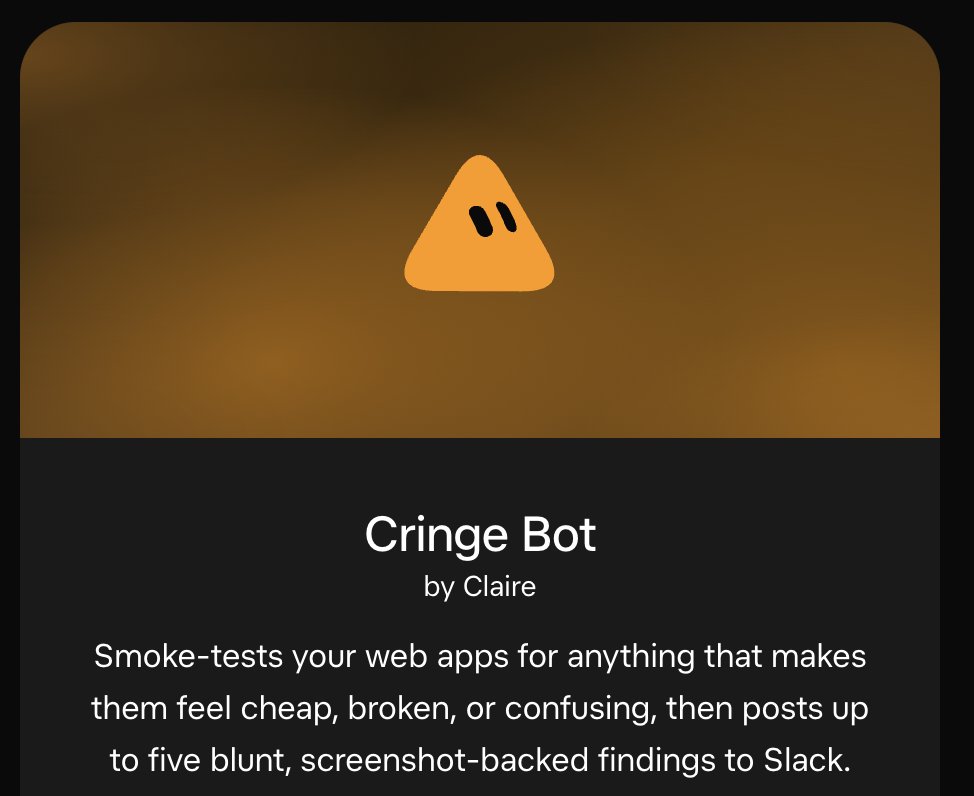
Claire Vo shares a Grok-powered bot built by Zach Davis that smoke-tests web apps and posts up to five screenshot-backed findings about design flaws three times a week. Davis says DevinAI investigates most findings and opens pull requests for them.

Original post · 1 min read
omfg @zachdavis made the @bot of my dreams, which looks at our @cxodev website and nits all the little design bugs and weird issues that accidentally get shipped.

Now you can have your own cringe bot:
x.ai/bot/OayZREvep4QIt3u8PNWdb
zachdavis @zachdavis
Cringe Bot is a team Grok Bot I created to find small problems with the stuff we build that makes our eyes twitch a little. It runs automatically 3x a week, does its own QA, and drops up to 5 findings per run with threaded screenshots.

It runs against our "marketing" website (cxo.dev), the custom app we built for our course, and a few other things. I take a quick look at the findings and have @DevinAI investigate and put up PRs for most of them.
x.aiCringe Bot by ClaireSmoke-tests your web apps for anything that makes them feel cheap, broken, or confusing, then posts up to five blunt, screenshot-backed findings to...
♥ 125 · ⟲ 5 · 👁 10.9KView on X ↗

Garry Tan Open-Sources 55 Claude Code Agent Skills as gstack

Garry Tan Open-Sources 55 Claude Code Agent Skills as gstack

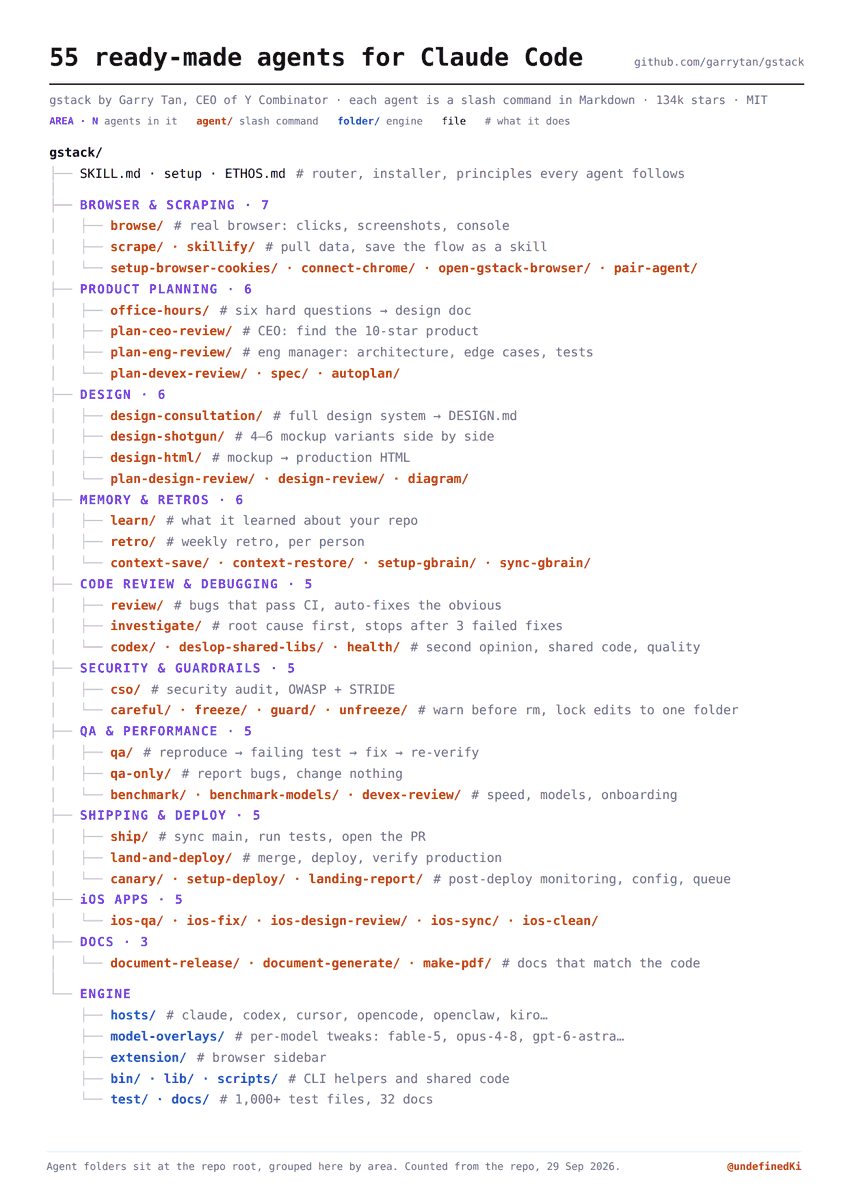
slash1s reports that Garry Tan open-sourced gstack, 55 Markdown slash-command agents for Claude Code under MIT license, grouped by role such as QA, security and shipping. The post explains installation and how the agents hand off work.

Original post · 1 min read
Garry Tan, the CEO of Y Combinator, open-sourced 55 ready-made agents for Claude Code

Each agent is a slash command in plain Markdown with its own role and rules. 134k stars, MIT.

What is inside:

> 7 for browser work and scraping
> 6 for product planning
> 6 for design
> 6 for memory and retros
> 5 for code review and debugging
> 5 for security and guardrails
> 5 for QA and performance
> 5 for shipping and deploy
> 5 for iOS apps
> 3 for docs

They hand work to each other. /office-hours writes a design doc, the plan reviewers read it, /qa and /ship check against it.

Clone it into ~/.claude/skills/gstack, run ./setup, then try /review on any branch.
Yarchi @undefinedKi
The 5 levels of AI agents. From a single prompt to a production agent (Complete course) — There are five words people throw around about agents right now. Context engineering, loop engineering, Jev engineering, harness engineering, eval engineering.
They sound like five competing
♥ 396 · ⟲ 50 · 👁 57.1KView on X ↗

Peter Steinberger Open-Sources Shared Configuration for AI Coding Agents

Peter Steinberger Open-Sources Shared Configuration for AI Coding Agents

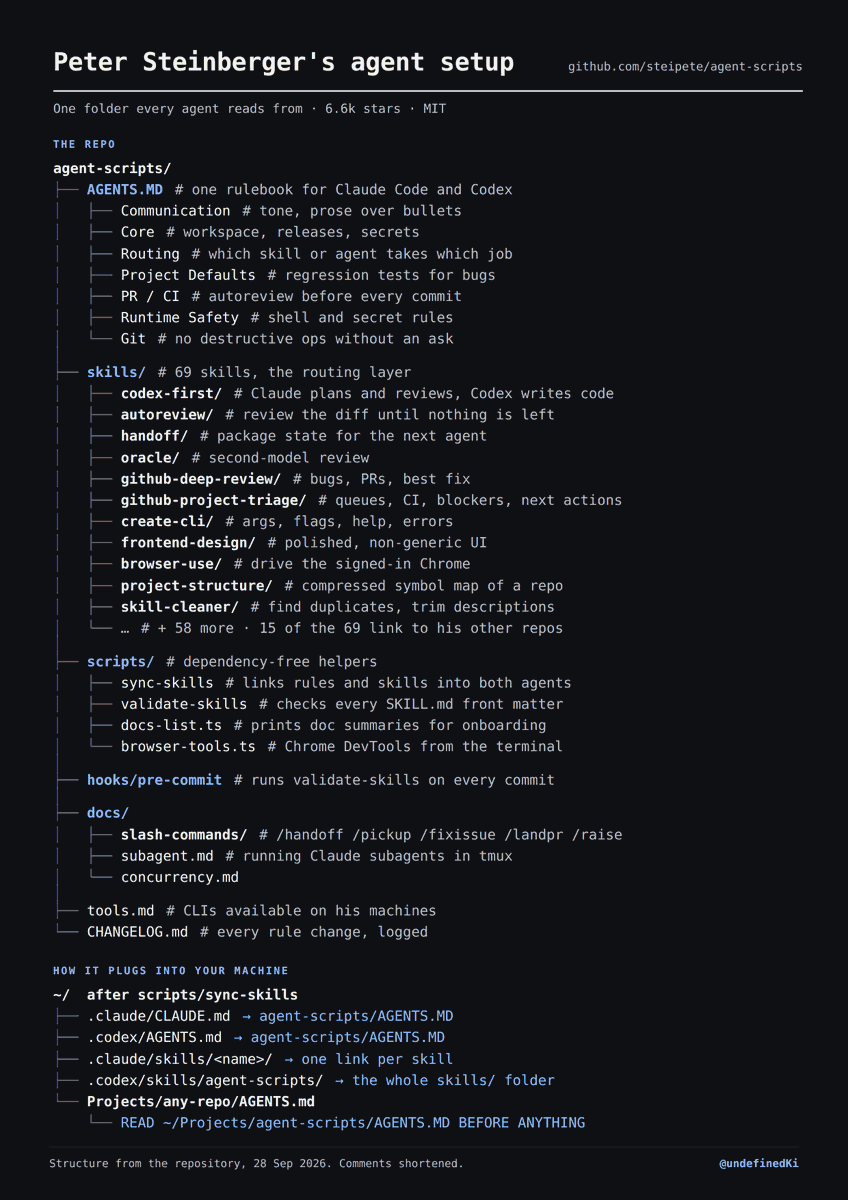
A post describes how OpenClaw creator Peter Steinberger open-sourced his agent-scripts repository, which uses a single AGENTS.MD file and symlinks to keep Claude Code and Codex on the same instructions. The repo has 6.6k stars and an MIT license.

Original post · 1 min read
Peter Steinberger, the creator of OpenClaw, open-sourced his entire agent setup

The core idea is one folder that every agent on his machines reads from.

A single AGENTS.MD holds his rules, and a script symlinks it into ~/.claude/CLAUDE.md and ~/.codex/AGENTS.md
This way Claude Code and Codex always follow the same instructions.

Every other repo gets one line at the top:
READ ~/Projects/agent-scripts/AGENTS.MD BEFORE ANYTHING.
Change a rule once and every project picks it up.

Skills work the same way. 69 of them live in one place, each with a short description the agent reads to decide what to load, and scripts/sync-skills links them into both agents.

Fork it, replace his rules with yours, and delete the skills you do not need. His AGENTS.MD is full of his own hosts and accounts.

6.6k stars, MIT - github.com/steipete/agent-scripts
Yarchi @undefinedKi
The 5 levels of AI agents. From a single prompt to a production agent (Complete course) — There are five words people throw around about agents right now. Context engineering, loop engineering, Jev engineering, harness engineering, eval engineering.
They sound like five competing
♥ 1.6K · ⟲ 193 · 👁 259.7KView on X ↗

Steve Yegge Promotes Beads as Open Source Memory System for Agents

Steve Yegge calls Beads the most mature open-source memory system for agents and says it reached 1.5 million downloads, pointing to planned versioned memory features and a proposed wire protocol.

Original post · 1 min read
Beads is the oldest and most mature OSS memory system for agents out there. It's the foundation for all my work for the past year, and has matured tremendously with the work of the Gas City folks.

Now that everyone is finally figuring out that they need to "grow" their company brains, I see all these products coming out. You don't need products, you just need Beads. Show it to your agent today.
Gas Town Hall @gastownhall
Beads just passed 1.5M downloads. Next up: teaching it to remember more than just issues.

Donna Box, Stephanie Jarmak and Jim Wordelman are working on versioned Memory Beads and BDP, the proposed wire protocol for Beads.

Give the preview branch a try!

blog.gascity.com/posts/extending-beads-memorie…
♥ 264 · ⟲ 7 · 👁 27.1KView on X ↗

Claire Vo Uses OpenAI Decisions API to Pick YouTube Thumbnails

Claire Vo Uses OpenAI Decisions API to Pick YouTube Thumbnails▶

Claire Vo describes using OpenAI's Decisions API with vision to choose the best thumbnail face from 40 minutes of footage for about $0.13. The API, now in public beta, selects models, tools or actions in near real time.

Original post · 1 min read
The Decisions API + vision + $0.13 = the cutest YT thumbnails in the game 👸

Here's how I'm using this cheapie little model to pick my best face from 40 minutes of footage:
OpenAI Developers @OpenAIDevs
Let your app choose the right model, tool, or action in near real-time with Decisions API, now available to all developers in public beta.

The Decisions API makes decisions up to 10x faster than GPT-6 Luna through the Responses API.
♥ 227 · ⟲ 11 · 👁 23.3KView on X ↗

Free Library Pairs 226 Claude Opus 5.5 Motion Graphics With Prompts

Prajwal Tomar promotes a gallery of motion graphics created with Claude Opus 5.5, each shown alongside the exact prompt that produced it, collected from posts on X and credited to their creators.

Original post · 1 min read
This guy collected 100s of Opus 5.5 motion graphics from X and put the exact prompt next to every single one.

Opus is CRAZY good at motion, most people just get stuck on what to type. This fixes that.

Pretty sure this is the best free motion library on X right now.
p4n @p4nthera_
I built a growing gallery of motion graphics made with Claude Opus 5.5, each shown next to the prompt or skill that made it.

226 so far, all pulled from posts here and credited to their creators.

prompt-motion.com/
♥ 99 · ⟲ 5 · 👁 16.0KView on X ↗

Guillermo Rauch Rebuilds Mini Browser in Rust and Swift, Dropping Electron

Guillermo Rauch Rebuilds Mini Browser in Rust and Swift, Dropping Electron▶

Guillermo Rauch describes porting his Mini web browser from Electron and Bun to Rust and Swift, citing faster boots, better security, and a more Mac-native feel. The app uses the cef crate for Chromium, embeds an agent via fx acp, and exposes MCP tools over ACP.

Original post · 1 min read
I¹ ported my Mini web browser to Rust & Swift. It's faster, more secure, and shockingly, nicer to iterate on than Electron + Bun.

I always wanted Safari-like UX but… Chrome 😁. Thanks to the 𝚌𝚎𝚏 crate, I can bundle up-to-date Chromium.

𝚏𝚡 𝚊𝚌𝚙 lets me embed an agent without bloating the app. It talks to my local fx CLI over ACP. fx can then manage the browser via an MCP server².

By ditching Electron, I was able to get Liquid Glass, faster boots, and a more Mac-native feeling. Little things like fine-grained focus and input control, which are nightmare fuel in JS, just work®.

Native is the future, both on the desktop and in the cloud. I suspect the entire software world will "nativify" faster than people realize, as DHH hinted at Rails World. Excited that Vercel's bet on Fluid will help support this, whether you choose to go Rust, Go, Zig, scriptc…

¹ Built on fx.sh with Opus 5.5 and Sol 6
² In the process I learned about agentclientprotocol.com/rfds/mcp-over-acp, which I'm now really excited about. This will allow a more secure and direct way to expose MCP tools
♥ 1.5K · ⟲ 59 · 👁 108.7KView on X ↗

Shopify Launches WebMCP Checkout Support for Browser Agents

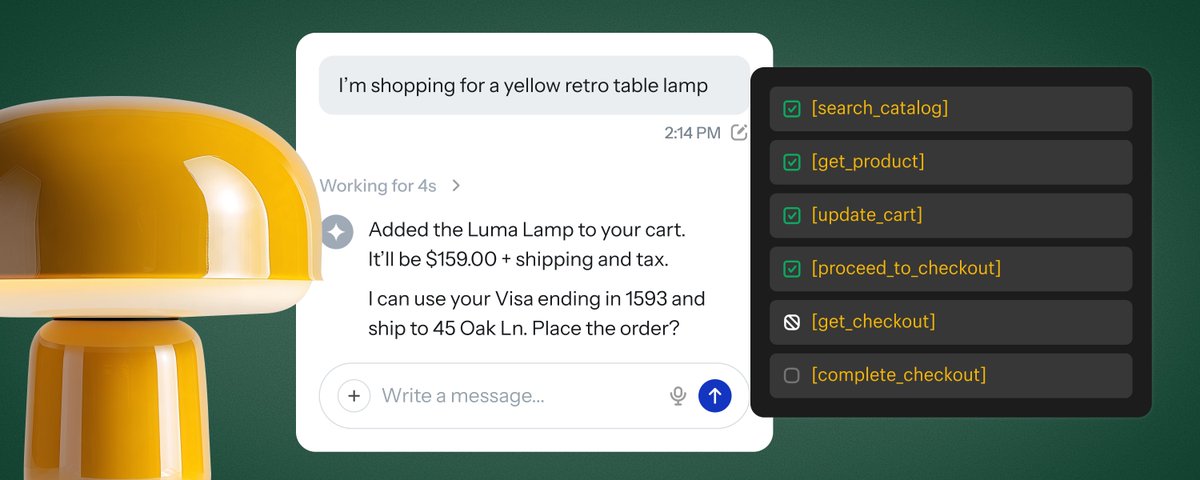
Browser agents now shop and check out faster on Shopify using WebMCP

Shopify announces WebMCP support for checkout, including Shop Pay, for eligible merchants, letting agents read, update and submit checkouts through structured tools instead of scraping pages. The author explains when to use UCP hosted MCP endpoints versus WebMCP in the browser.

Original post · 6 min read
Shopping with an agent shouldn’t feel like watching paint dry. 🥱
Today, we’re launching WebMCP support for checkout, including Shop Pay, for all eligible Shopify merchants.

Learn how it works, where UCP fits, and what the data shows:
X ArticleBrowser agents now shop and check out faster on Shopify using WebMCP
Today, we’re launching WebMCP support for checkout, including Shop Pay, for all eligible Shopify merchants. I recently wrote that shopping with a browser agent is often slower and less reliable than doing it myself. The agent reads the page, finds an input, fills it, and reads the page again to figure out what changed. Then the agent does that again, and again, and again for every input. Sometimes, it even fills in the wrong information.
We already support WebMCP for storefronts and carts, so agents can search products, browse collections, and add items to a cart through structured tools. Now they can also read the checkout, update it, and submit it with the buyer’s authorization. From search to order, no screenshots or scraping required.
When should you use WebMCP?
Shopify exposes structured commerce APIs via the Universal Commerce Protocol (UCP), that enable agents to discover products, build carts, and checkout. UCP is the shared language that hosted MCPs and WebMCP both speak to. These are different access methods to the same protocol, to support wherever your agent runs.
Some agents work entirely server to server. Some work inside the buyer's browser. Some do both in one purchase, like an agent that builds a checkout through our APIs and moves into the browser when the buyer needs to review or verify something.
So here's my recommendation. If your agent can work without a browser, then go server to server, reach UCP through our hosted MCP endpoints, like Checkout MCP. It's the most efficient path, as it does not require loading and rendering pages and orchestrating a browser.
If your agent is operating in the buyer’s browser, use WebMCP tools provided on storefront and checkout to efficiently complete order placement, instead of navigating HTML built for humans. These WebMCP tools provide structured and efficient APIs, purposely designed — via UCP — to ensure accurate commerce facts, required disclosures, and handoff requirements.
A checkout interface built for agents
I’ve worked on checkout for years and I know that details matter. An address changes the available shipping options; a delivery choice changes the total, which may in turn affect discount eligibility and more; a merchant may require the buyer to accept terms before placing an order. An agent has to get these right.
With WebMCP, checkout surfaces tools with well-defined names, descriptions, and input schemas that capture the full fidelity of required inputs and context to negotiate a checkout. A browser agent can now discover those tools and call them in the buyer’s existing session.
There are three core tools:
get_checkout reads the current checkout, including line items, totals, fulfillment options, and messages about what’s missing or blocking.
update_checkout applies the desired writable state through checkout’s existing validation and returns the recalculated checkout.
complete_checkout attempts to place the order after the agent signals buyer authorization for the purchase.
The responses tell the agent what’s still missing, if buyer action is required, and when the order has been placed.
Updates describe the desired state
Updates are PUT-style. An agent sends the complete desired state for the writable fields accepted by update_checkout, and receives the full updated response, eliminating guesswork and possibility of missed terms or requirements.
For example:
The buyer changes their shipping address.
The agent submits the new address alongside the values it needs to retain.
WebMCP returns the full updated checkout and messages, which enables the agent to immediately detect and reason through cases where only partial fulfillment is available, split shipping is required, and all of its downstream consequences.
The agent can then select a delivery option from that response in its next update.
Less guesswork and fewer turns for the agent, with more reliable outcomes for the buyer.
Just how much better is WebMCP?
Browser agents spend time repeatedly interpreting screenshots or scraping the DOM and deciding where to click or type. Take a Shop Pay buyer with multiple saved addresses. With browser automation, the agent has to open the address book, parse the page, and click through to make a selection. With WebMCP, it can retrieve those addresses and select the right one by ID. The address book is already structured data. The agent should be able to use it that way.
We compared WebMCP in checkout with browser use using GPT-6 Sol, with the same prompts and starting conditions. We tested 10 checkout tasks across 2 test shops, running each task 6 times with each approach: 30 paired comparisons, or 60 attempts in total.
In this benchmark, here’s how WebMCP performed:
Time per attempt: 27.4s → 10.3s, or 2.7x as fast.
Cost per attempt: 58% lower when using WebMCP, at OpenAI’s list price.
Successful attempts: 56/60 with browser automation → 60/60 with WebMCP.
Tasks included updating an address, applying and removing a discount, updating an email, e… continue on X ↗
♥ 146 · ⟲ 18 · 👁 41.5KView on X ↗

Cursor Engineer Shares Prompt for Improving Agent Token Efficiency

Eric Zakariasson shares a detailed prompt based on Cursor's experience for optimizing an LLM agent harness's token efficiency without hurting task quality. It covers measuring cost per completed task, weighting token billing types, and avoiding prompt patterns that make models reluctant to work.

Original post · 15 min read
here's a prompt to improve your agent harness based on what we've learned at cursor. enjoy

# Improve this agent harness's token efficiency

You're working on an LLM agent harness: the system prompt, tool definitions, request assembly, context caching, compaction, and retrieval, and how work is split across agents. Make the agent's runs cheaper without making it worse at its job.

- Objective: lower price-weighted token cost per completed task.
- Constraint: no measurable drop in task quality.

Measure per task, not per request. Every turn resends the prefix (tools, instructions, setup, and the conversation so far), so a change that shrinks each request but adds turns can cost more. Weight tokens by billing type: output, uncached input, and cached input are priced very differently.

Work in this order: map the harness and measure the baseline, rank the opportunities, make the changes that are safe to make directly, put the rest behind flags or in proposals, then report.

Figures below come from one team's production coding agent and its multi-agent experiments. Use them to gauge magnitude, not as targets. One round of these changes (prompt trimming, tool offloading, cache layout, sparse line numbers, subagent tuning) cut that team's overall token cost about 7% with no loss in quality. The larger percentages apply only to the part of the request each change touched.

## Principles

1. Change what the harness sends, not how hard the model tries. Don't ask the model to conserve tokens. A harness that told its model to "take care to preserve tokens and not be wasteful" found it grew reluctant to take on ambitious tasks and sometimes quit, saying it wasn't supposed to waste tokens.
2. Capable models need definitions, not commands. Lists of "DO NOT", "You must", and "Important", and guards against older models' habits, can usually be replaced with plain descriptions of what each tool does. One team cut about two-thirds of its system prompt this way, and the shorter prompt worked across model families. Instruct only on what the model can't know (the product, the environment, the user's processes) and on quirks you've seen in transcripts.
3. Static context is for what most turns need. Everything else should be discoverable when needed. Less up-front context also means less confusing or contradictory information.
4. Expect removals to win. Guardrails written for weaker models, coordination steps that became bottlenecks, and prompting for behavior the model now does on its own all cost tokens.
5. Real usage decides. Evals are a fast proxy, but they skew toward hard problems and miss the real mix of requests.

## 1. Map the harness and measure the baseline

Find:

- Where requests are assembled, the system prompt, and tool schemas. If a framework or SDK builds requests, find its hooks for message order, cache control, and tool loading.
- How tool results are formatted, and how history is kept, trimmed, or summarized.
- How subagents or parallel agents are spawned, if any.
- Which models and provider APIs are used. From the provider's docs, get the prompt caching behavior (automatic or explicit breakpoints, TTL, minimum cacheable length) and the prices for output, uncached input, and cached input.
- Existing logging, token accounting, and evals.

If the harness doesn't record per-request token usage by billing type and cache hits, add that first. Everything later depends on it.

Then render a few real requests (from logs, or by running representative tasks) and count tokens per section with the model's tokenizer or the API's usage fields. Produce:

- Cost share by source × billing type. Sources: system prompt, tool definitions, skill/rule/integration descriptions, user messages, file reads, search results, command and other tool output, history, summaries, subagents.
- Static tokens per request, cache hit rate, and turns per task.
- Per tool: the share of runs that call it at least once, and its error rate.

Read the rendered requests, not just the templates. Duplication, leaked volatile values, and misordered blocks only show up there.

Rank opportunities by share of spend × fraction removable ÷ quality risk.

## 2. System prompt and injected context

Label every instruction:

- Keep: product or environment knowledge the model can't infer, fixes for quirks seen in this model's transcripts, and rules a mode depends on.
- Rewrite: commands and emphasis into plain descriptions. Reminders into constraints: "No TODOs, no partial implementations" works better than "remember to finish implementations." Vague quantities into ranges: "generate 20–100 tasks" gets far more ambitious behavior than "generate many tasks."
- Delete: things capable models do by default, guards against behavior you haven't seen from this model, text that repeats tool descriptions, and lines that could contradict a user request. Models trained to rank system instructions above user messages will side with the system prompt.
- Move: anything per-user or per-request (date, environment, repo state, lists of skills or subagents, user rules) into a user-role setup message after the cache boundary.

Audit other injected context the same way. As models improved, the team behind these figures dropped directory trees, pre-retrieved snippets, compressed copies of attached files, lint errors injected after every edit, forced expansion of short file reads, and caps on tool calls per turn. They kept small, high-value facts: OS, repo status, and open or recently viewed files.

Skip checklists for open-ended work. The model optimizes the listed items and deprioritizes everything else.

## 3. Tool definitions

Tool schemas ride along on every request. Most tools beyond the core set were each needed in under 20% of conversations, and moving them out of static context cut tool-description tokens 60%. Doing the same for integration tools (such as MCP servers), with names in context and full schemas in one folder per server that the agent can search with grep or jq, cut total tokens 46.9% in sessions that used them.

- Keep in static context: high-frequency tools (for a coding agent: read, search, edit, shell), tools the model tries to call even when they're absent, and tools a mode depends on.
- Offload the rest: leave a name or one-line pointer and make the full schema discoverable on demand. Group related tools so they load together, and put status (such as "needs re-authentication") where the agent will see it.
- Tighten what remains: describe behavior and arguments, and drop usage lectures.
- Pick the split by testing a few configurations and tracking tokens, cost, latency, tool-call errors, and task success.

## 4. Cache layout

Order each request so the reusable prefix is as long as possible:

`tool definitions → system instructions → [breakpoint] → setup message (skills, subagents, rules, environment) → [breakpoint] → conversation`

- Keep the prefix byte-identical across turns. Use deterministic tool order and serialization, put timestamps and IDs after the boundary, and don't rewrite earlier messages except when compacting.
- Use explicit breakpoints if the provider supports them. Otherwise rely on automatic prefix caching with the stable part first. Respect TTL and minimum-length rules.
- Switching models mid-conversation throws away the cache (caches are per model and provider) and hands the new model a history it didn't write. When a different model is needed, run it as a subagent with fresh context.

Explicit breakpoints plus moving per-request setup after them cut cold cache misses 20%.

## 5. Tool results and other context added during a run

- Large outputs (commands, integrations, logs): write them to a file and return the path, size, and a short tail. The agent can tail, grep, or read ranges for more. Truncating loses data, and inlining bloats every later request. Treat long-running terminal sessions the same way.
- High-volume formats: look for overhead repeated on every line or item. Numbering every 10th line of a file read instead of every line cut cache-read tokens 1.6% without hurting citation accuracy. Each number costs 3–5 tokens, and agents read tens of thousands of lines per session. Also check repeated absolute paths, verbose JSON keys, ANSI codes, progress bars, and repeated headers.
- Good retrieval saves exploration turns. Adding semantic search alongside grep raised codebase question-answering accuracy 12.5% on average and cut the iterations users needed.
- Tool errors waste tokens and leave confusing debris in context. Classify expected errors (invalid arguments, unexpected environment, provider error, timeout, user abort), treat unknown errors as harness bugs, and track rates per tool and per model. One focused effort along these lines cut unexpected tool errors 10×.

## 6. Long runs: compaction, subagents, and model mix

- Compaction: keep the summarization prompt short and the summary compact, carry forward plan state and remaining tasks, and save the full history to a file the agent can search for details the summary dropped. A model trained to self-summarize from a one-line prompt wrote ~1k-token summaries with half the compaction error of a multi-thousand-token prompt that produced 5k+ token summaries. Untrained models may need more guidance, so test how short you can go. A more expensive summarization model made a negligible difference.
- Scratchpads and running notes: rewrite them instead of appending. For repeated work in one environment, a small agent-maintained notes file with a line budget, loaded at start, is a promising way to shorten later runs.
- Subagents: fresh context keeps the parent lean, but isolation adds coordination cost (duplicate or stale work). If the model already delegates on its own, remove prompting that pushes it to. Have subagents return short handoffs: what was done, findings, concerns, and deviations. A subagent should use a different model only when the user or harness says so.
- Model mix: in large multi-agent runs, workers used at least 69% of tokens, and over 90% in most runs. A frontier planner with cheap workers matched a frontier model doing everything at about one-eighth the cost. Planner choice still changes worker spend. One planner that cost less on its own saw its workers use several times more tokens, and the run cost more overall. Measure the whole tree.
- Routing and reasoning effort: send simple turns to a cheaper model or lower effort, and upgrade only when a stronger model is clearly better. A router built this way matched or beat single frontier models on user satisfaction at 41–68% lower cost.
- Reasoning continuity: if the API returns reasoning items (including encrypted ones), pass them back on later turns and alert when they go missing. Dropping them cost one reasoning model 30% on a coding benchmark, and it burned tokens reconstructing its plan.

## 7. Fit the harness to each model

Adapt to what each model was trained on instead of forcing one shape on all of them. If you've tuned the harness for a similar model, start from that version.

- Edit format: use the one the model was trained on (for example, patch-style or search-and-replace). An unfamiliar format costs extra reasoning tokens and causes more mistakes.
- Shell or tools: shell-first models fall back to `cat` or inline scripts. Name tools after their shell equivalents (such as `rg`), and if needed add: "If a tool exists for an action, prefer to use the tool instead of shell commands (e.g. read_file over `cat`)."
- Literalness: some model families follow instructions literally and others tolerate imprecision. Some spiral on emphasized wording. Strip caps and emphasis for literal models.
- Triggers: some models ignore a tool until told when to use it. A literal trigger works: "After substantive edits, use the <lint tool> to check recently edited files for linter errors. If you've introduced any, fix them if you can easily figure out how."
- Progress updates: if a model reports progress through reasoning summaries, keep them to 1–2 sentences that note new findings or a change of tactic, and remove instructions about messaging mid-turn.
- Quirks worth a targeted line: hedging or refusing as context fills ("context anxiety"), declaring completion early, stopping to ask permission, and calling tools that don't exist.

Tie each added instruction to the transcript behavior it fixes. Re-audit when models change, since guidance one version needed can be dead weight for the next.

## 8. Validate

- Offline: run a fixed set of realistic tasks before and after, ideally drawn from real usage and phrased the way users actually write (short and ambiguous). Compare task success, tokens, cost per task, turns, and tool errors. Don't ship a change that lowers success.
- Online, if you have users: A/B test each change or small bundle. The primary metric is cost per completed task. Guardrails are task success signals, tool-call errors, latency, turns per task, and cache hit rate. For a coding agent, a good success signal is how much agent-written code survives over time. In general, check whether the user's next message moves on or reports a problem.
- Ship only when cost drops and no guardrail regresses beyond noise. Record null results.

## What to change directly and what to propose

- Change directly, each in its own revertible commit: token and cache telemetry, deterministic serialization and tool order, moving volatile content out of the cached prefix, explicit cache breakpoints, writing large outputs to files instead of truncating, passing back reasoning items that are being dropped, and fixes for recurring tool errors.
- Change behind a flag so it can be tested: system prompt edits, tool offloading, output format changes, compaction changes, and subagent prompting.
- Propose only: changes to which models run, routing, reasoning-effort defaults, or how work is split across agents.

## Traps

- Asking the model to use fewer tokens or do less.
- Truncating tool output.
- Dropping reasoning items to save input tokens.
- Volatile content in the cached prefix, or tool order that changes between requests.
- Offloading a tool the model needs on the first turn or tries to call when it's missing.
- Emphasis-heavy prompts (MUST, NEVER, IMPORTANT, all caps), especially with literal models.
- Forcing a terser output format than the model was trained on. Fewer output tokens can mean less thinking and worse results.
- Optimizing raw token counts instead of cost, per request instead of per task, or evals instead of real usage.
- Switching models mid-conversation to save money.
- Adding coordination layers that become bottlenecks.

## Report back with

1. The harness map and baseline: cost by source × billing type, with the biggest sources called out.
2. A ranked list of changes: layer, what changes, estimated savings and how you estimated them, quality risk, how to validate, and how to roll back.
3. The changes you made, including a system prompt diff with a keep, rewrite, delete, or move reason for each line.
4. A test plan for the flagged changes.
5. Gaps: anything you couldn't find or measure.
♥ 3.3K · ⟲ 148 · 👁 353.1KView on X ↗

Ben Holmes Uses AI Agent to Generate Visual Code Explainers

Ben Holmes Uses AI Agent to Generate Visual Code Explainers▶

Ben Holmes says he took Andrej Karpathy's advice and asked an AI agent for visual walkthroughs, which produced a before-and-after HTML explainer for a mobile caching PR. He says it helped him align on architecture before opening GitHub.

Original post · 1 min read
Took @karpathy's advice and started asking the agent for more visuals to walk through code. He's right. These models are so capable now.

Here I asked for a before-and-after HTML explainer on a PR that adds caching to our mobile app. Opus 5.5 gave a step-by-step diagram of the new flow, screenshots, and pointed me to the code worth reviewing. No skills being used here; it just knew what to show.

Saved a lot of time and let me align on architecture before opening GitHub
Andrej Karpathy @karpathy
We'll be spending a lot more time trying to understand the outputs of language models. A few thoughts, tips & tricks:

Writing. Something I've had success with: Ask your LLM to explain something in ASD-STE100, it's a controlled language specification originally developed for aerospace maintenance documentation. LLMs well-versed in this language and it comes with heavy constraints on clean writing style that I often find a lot more readable. Sometimes I've tried to soften it a bit e.g. ask for "80% of the way to ASD-STE100" because the spec is quite stringent. But even better:

Diagrams / image…
♥ 761 · ⟲ 45 · 👁 57.6KView on X ↗

First-Principles Thinking Packaged as a Claude Skill for PMs

George of prodmgmt.world shares a method for product managers: paste a first-principles prompt into Claude to stress-test a PRD or roadmap decision. The post quotes Nuri Janian's description of /first-principles as a key PM skill.

Original post · 1 min read
First-principles thinking, distilled into a skill

Paste it in, ask Claude to stress-test your PRD / roadmap call, and watch the fake certainty fall off in real time
George from 🕹prodmgmt.world @nurijanian
/first-principles: the key skill for PMs — First principles thinking can help you analyse complex, long-standing problems.
Elon Musk's widely known examples benefit from using physics as a reliable starting point. For most other people, their
♥ 690 · ⟲ 62 · 👁 63.6KView on X ↗

Guide Shows How to Build Motion Graphics With Claude Code

Guide Shows How to Build Motion Graphics With Claude Code▶

Aakash Gupta shares a six-step workflow for generating animated motion graphics in Claude Code with Claude Sonnet 5.5, covering reference images, timed states, time-based functions, styling rules, self-review, and ffmpeg GIF export.

Original post · 2 min read
Claude Sonnet 5.5 can (finally) generate motion graphics

15 motion graphics in Claude Code (my 6 steps):

1. Show it an example.
Screenshot a graphic you like (the one on this post works), attach it and write: "Make this move. One HTML file, inline SVG, no libraries, a 6 second loop." Start there and fix it round by round. Say the loop length up front so it does not guess.

2. Write the states, in order.
A reference gets you the look. For the motion, say what happens and when. My command palette brief: the key chip presses at 0.6s, the palette springs open at 0.95s, four letters land between 1.35s and 2.1s and the list filters after each one, the highlight drops a row, Enter at 3.9s, a toast rises. Six lines of plain English.

3. Make time the only input.
Tell it every element is a pure function of t, from 0 to 6 seconds. No timers, no CSS keyframes, and frame 0 equals frame 6. The loop closes itself and any frame can be drawn on demand. The palette opening is a single line: k = spring(t - 0.95, 240, 18).

4. Give it colours, fonts and rules for motion.
Hex codes and font names. Mine are Claude orange #D97757, navy #0F1B2E and DM Sans. Words like clean and modern do nothing. Springs for anything that lands, eases for anything that leaves. Mix them up and it feels cheap. When you can, morph one shape into the next. In my terminal loop, a log line's highlight bar grows into a dashboard card. Same rectangle, new size.

5. Make it check itself.
"Render 8 moments across the loop side by side and fix what's wrong." That is how a black sphere and two cards stuck in one slot got caught. Point at fixes by timestamp: "at 2.0s the second row overlaps the first." Read the sheet yourself too.

6. Export a GIF that stays sharp.
Save every frame as a PNG, then run ffmpeg with palettegen stats_mode=full and paletteuse dither=none. I use 15 frames a second. One palette for the whole clip and no dithering, so flat colours stay flat. Post it as an image, not a video, and check the animation survived the upload.

The 15 in the image include a prompt bar that turns into a web page, a funnel you can watch leak, a donut that unrolls into a bar and a command palette that filters as you type. Each one is a single HTML file with no libraries.

I write about builds like this at aibyaakash.com:
aibyaakash.com?utm_source=ag-20261001

Pick one motion. Write the six lines. Ship it today.
♥ 238 · ⟲ 17 · 👁 16.0KView on X ↗