Thursday, October 8, 2026ArchiveSearchAsk the paper

The Computomatix Times

All the posts fit to save — curated from @computomatix's bookmarks & likes on X

Search

289 stories

Steven Tey Urges Admins to Restrict Unconfigured Google OAuth Apps

Steven Tey Urges Admins to Restrict Unconfigured Google OAuth Apps

Steven Tey warns that third-party Google OAuth apps requesting scopes beyond basic profile data are a dangerous attack vector. He recommends Workspace admins restrict unconfigured third-party apps, linking to the Google admin settings page and crediting a tip.

Original post · 1 min read
Biggest takeaway from this: 3rd-party Google OAuth Apps that request scopes beyond the basic info (name/user/profile pic) is a dangerous attack vector.

To safeguard your org from attacks like this, highly recommend asking your Google workspace admin to restrict "unconfigured third-party apps" to only be able to request basic info needed 👇

Here's the direct link to access that settings page: admin.google.com/ac/owl/settings

h/t @matid for the pro-tip!
Guillermo Rauch @rauchg
Here's my update to the broader community about the ongoing incident investigation. I want to give you the rundown of the situation directly.

A Vercel employee got compromised via the breach of an AI platform customer called Context.ai that he was using. The details are being fully investigated.

Through a series of maneuvers that escalated from our colleague’s compromised Vercel Google Workspace account, the attacker got further access to Vercel environments.

Vercel stores all customer environment variables fully encrypted at rest. We have numerous defense-in-depth mechanisms to prot…
♥ 1.7K · ⟲ 201 · 👁 331.6KView on X ↗

Guide Explains How to Triage Compromised Google Workspace OAuth App

Omar shares steps for Google Workspace admins to check for a compromised third-party OAuth app tied to the Vercel incident. The instructions cover navigating admin API controls and revoking access by client ID.

Original post · 1 min read
Here's how to triage:

1. Go to admin.google.com

2. Security → Access and data control → API controls → App access control → Manage Third-Party App Access

3. Search for client ID:
110671459871-30f1spbu0hptbs60cb4vsmv79i7bbvqj

if found → revoke / block
Vercel @vercel
Our investigation has revealed that the incident originated from a third-party AI tool with hundreds of users whose Google Workspace OAuth app was compromised.

We recommend that Google Workspace Administrators check for usage of this app immediately. vercel.com/kb/bulletin/vercel-april-2026-secur…
♥ 2.2K · ⟲ 275 · 👁 571.3KView on X ↗

Pi-hole Offers Network-Wide Ad Blocking on a Low-Cost Device

Pi-hole Offers Network-Wide Ad Blocking on a Low-Cost Device

Nav Toor explains Pi-hole, open-source software that runs on a cheap device like a Raspberry Pi Zero to block ads and trackers for every device on a home network. He describes how it works at the DNS level and lists what it blocks.

Original post · 2 min read
You see hundreds of ads every single day. On your phone. Your laptop. Your smart TV. Your game console. Your kid's tablet. Even your thermostat.

Someone built a tiny $5 computer that blocks every single one of them. For every device in your house. Forever.

It's called Pi-hole.

Not a browser extension. Not an app. A network-wide ad blocker that lives on your WiFi. Every device that connects to your home internet gets ad-free browsing automatically. No setup on each device. No subscription. No tracking.

Here's how it works:

Every time your phone loads an ad, it asks the internet "where is this ad server?" Pi-hole sits between your phone and the internet. When your phone asks for an ad, Pi-hole says "that server does not exist" and the ad never loads.

The ad is dead before it reaches your screen.

Here's what Pi-hole blocks:

→ Ads in mobile apps. Ads inside games. Ads on free apps that usually can't be blocked.
→ Smart TV ads. Roku ads. Amazon Fire ads. Samsung TV ads. Every TV ad at the DNS level.
→ Tracking pixels. Facebook tracking. Google Analytics. TikTok pixels.
→ Telemetry. Windows spying on you. Apple sending data. Your smart fridge phoning home.
→ Malware domains. Phishing sites. Crypto miners.
→ Ads and telemetry on Xbox, PlayStation, and Nintendo Switch.

Here's the wildest part:

A Raspberry Pi Zero costs $5. An old Android phone, you already own. An old laptop in your closet, you already own.

Any of them can run Pi-hole.

One small device. Plug it in once. Forget about it. Every phone, tablet, laptop, smart TV, and game console on your WiFi gets ad-free browsing.

Forever.

No monthly fee. No subscription. No tracking. No account. No login.

Pi-hole users report their home internet feels faster because ads are never downloaded in the first place.

The developers are volunteers. They've been building this for over a decade. It handles hundreds of millions of DNS queries on server-grade hardware.

52,000+ GitHub stars. EUPL-1.2 license.

100% Open Source.
♥ 2.3K · ⟲ 417 · 👁 132.7KView on X ↗

Weekly Roundup Lists Fastest-Growing Finance GitHub Repositories

Weekly Roundup Lists Fastest-Growing Finance GitHub Repositories

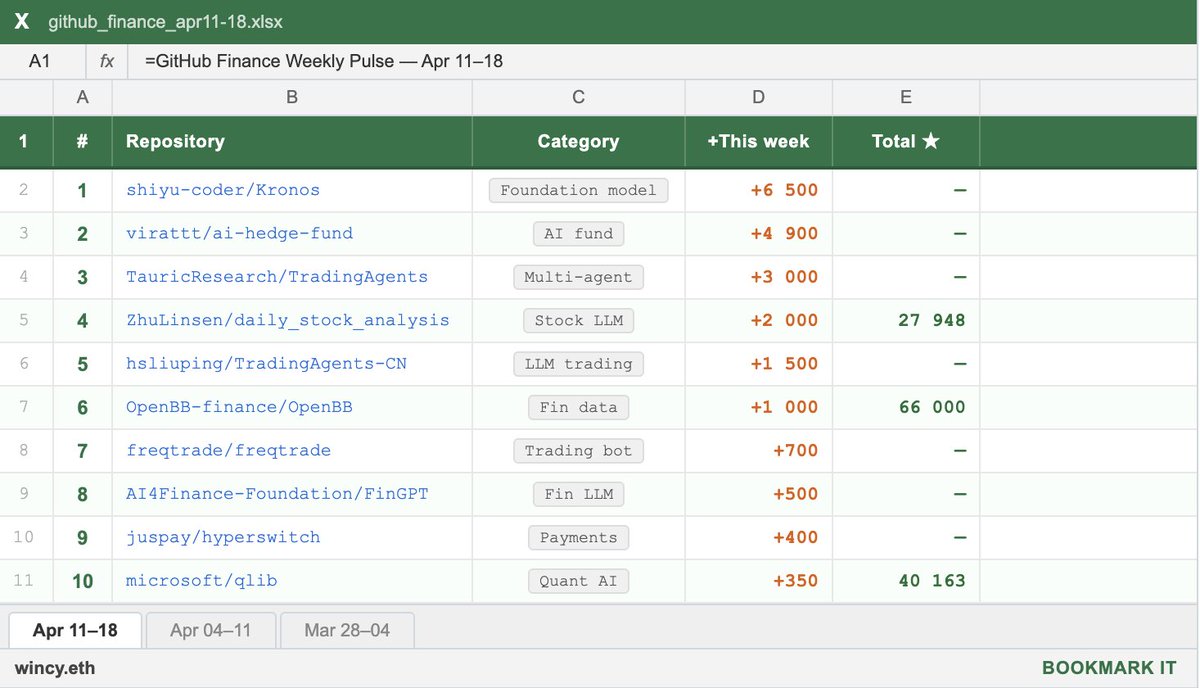
wincy.eth lists fast-growing open-source finance projects on GitHub, including Kronos, a candlestick foundation model, ai-hedge-fund, TradingAgents, daily_stock_analysis, OpenBB, and freqtrade. The post highlights star counts and what each project does.

Original post · 2 min read
the fastest growing GitHub repos in finance this week:

1. shiyu-coder/Kronos (+6.5K ★)

first open-source foundation model for financial candlesticks. trained on 45+ global exchanges. predicts OHLCV candles as tokens — literally GPT for price charts. accepted at AAAI 2026.

2. virattt/ai-hedge-fund (+4.9K ★)

a team of AI agents simulating Buffett, Munger, Ackman, Cathie Wood and others. each agent runs its own strategy, a Portfolio Manager makes the final call. one of the most viral finance repos right now.

3. TauricResearch/TradingAgents (+~3K ★)

multi-agent LLM trading framework. fundamental analyst, sentiment analyst, technicals, risk manager — all working together. supports GPT-5.x, Gemini 3.x, Claude 4.x, Grok. built by UCLA/MIT researchers.

4. ZhuLinsen/daily_stock_analysis (+~2K ★)

LLM stock analyzer for US, A-share and H-share markets. auto-builds a daily decision dashboard with exact entry/exit levels. pushes to WeChat/Telegram/Discord/Email via GitHub Actions. zero cost, zero server.

5. hsliuping/TradingAgents-CN (+~1.5K ★)

Chinese fork of TradingAgents. fully localized for A-share markets (Shanghai/Shenzhen), Chinese data sources, and domestic LLMs. 5.1K forks — very active community.

6. OpenBB-finance/OpenBB (+~1K ★)

open-source Bloomberg alternative. stocks, crypto, options, derivatives, fixed income — one platform. integrates with AI agents via MCP. 66K total stars and still climbing.

7. freqtrade/freqtrade (+~700 ★)

free, open-source crypto trading bot in Python. supports all major exchanges, full backtesting, strategy optimization, Telegram control. release 2026.3 just dropped.

8. AI4Finance-Foundation/FinGPT (+~500 ★)

open-source financial LLMs trained on real market data — news, filings, earnings. built for sentiment analysis and robo-advisors. models on HuggingFace, ready to deploy.

9. juspay/hyperswitch (+~400 ★)

open-source payments router in Rust. one API to connect Stripe, Adyen, PayPal and 50+ providers. smart routing, high performance, built for fintech scale.

10. microsoft/qlib (+~350 ★)

Microsoft's AI quant investment platform. covers the full pipeline: alpha seeking, backtesting, model training, live trading. supports ML/DL, RL, and auto-quant.

bookmark this and start today.
wincy.eth @gusik4ever
the fastest growing GitHub repos in finance this week:

1. mvanhorn/last30days-skill (+2.1K ★)

AI agent skill that searches Reddit, X, YouTube, HN, Polymarket and the web in parallel — then scores results by upvotes, likes, and real money, not editors. drop it into Claude Code or OpenClaw. zero config to start.

2. ZhuLinsen/daily_stock_analysis (+1.2K ★)

LLM-powered stock analyzer for US, A-share and H-share markets. real-time news + multi-source data + decision dashboard with exact buy/stop/target levels. runs on GitHub Actions on a schedule at zero cost. pure automation.

3. juspay/hypers…
♥ 1.7K · ⟲ 234 · 👁 240.0KView on X ↗

Ryan Mather Shares Tips for Getting Results From Claude Design

Anthropic's Ryan Mather posts a thread of tips for using Claude Design, which he says he uses across seven products on the verticals team. The first tip advises setting up a design system and core screens before prototyping. The thread references Anthropic's Claude Design launch built on Claude Opus 4.7.

Original post · 1 min read
🧵 My tips for getting the best results out of Claude Design! I’m on the verticals team at Anthropic which means I serve 7 different products. Claude Design makes it possible!
1. Set up your design system and your core screens. An hour of setup and refinement here is worth it
Claude @claudeai
Introducing Claude Design by Anthropic Labs: make prototypes, slides, and one-pagers by talking to Claude.

Powered by Claude Opus 4.7, our most capable vision model. Available in research preview on the Pro, Max, Team, and Enterprise plans, rolling out throughout the day.
♥ 8.7K · ⟲ 672 · 👁 1.5MView on X ↗

Ryan Wiggins Details Building a Local Second Brain With Claude Code

Creating a Second Brain with Claude Code

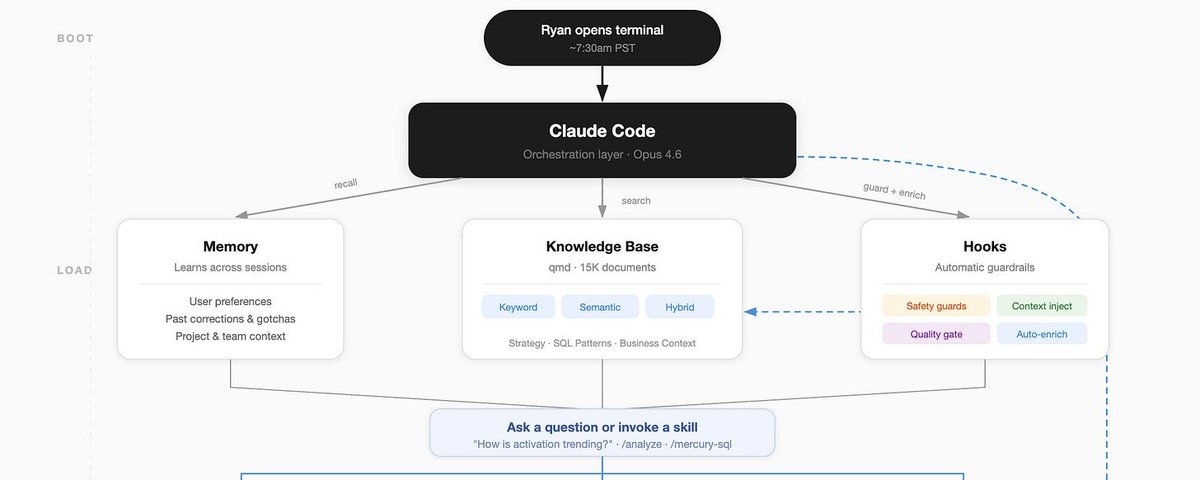
Mercury VP of Product Ryan Wiggins published a long article describing a locally run personal knowledge system built with Claude Code, indexing about 15,000 documents using QMD vector search, with hooks, orchestrators and MCP/CLI tools. He says it doubled his productivity and includes the workflow and prompt.

Original post · 11 min read
X ArticleCreating a Second Brain with Claude Code
I've 2x’d my productivity as a VP of Product @mercury by creating a "Second Brain" using 5 years of work history, 15k docs with 3.5 million words, and every tool in my stack. It runs locally, is a core part of my every use of LLM, and gets better everyday.
Today, I want to share the stack, the workflow, and the prompt to build it:
Background
I am a VP of Product for @mercury, which is a long way of saying I'm in a lot of meetings, consuming a lot of content across different tools (linear, slack, notion, data analyses), and trying to make sure I actually get stuff done. Working at a company for 5 years and being an information addict, I am essentially a walking encyclopedia for Mercury post 2021-today -- but I've recently found that my scope + workload means I can't keep every plate spinning.
One day, I was scrolling X and came across a series of posts that caught my attention, starting with @tobi's QMD. QMD is a local vector search, and then a few other posts started to show up that connected a few dots for me:
Claude Code launched hooks (per-event prompt injections)
GasTown / OpenClaw launched with the power of orchestrators writing memory + delegating to sub-agents (among many other patterns)
MCPs/CLIs hit a critical mass, and enough of my core tools were available without having to ask admins to give me API keys
@tylercowen did an interview and talked extensively about "writing for AI" in a way that struck a chord - how much output of work already exists that I'm not using?
I decided that it was time to build
Prep work (~1-2 hours end to end)
To start, I needed a library of all the content I could know about... so I downloaded every document I've ever created for my job at Mercury + any relevant product strategy, analysis, retro, reflection on execution, etc. This netted out to over 15k documents and 3.5 million words. Maybe I've read them all, but I've forgotten most. These became a folder that I just called "raw data", and I ran QMD to index this on my computer.
To see if this worked, I used Claude Code to ask about random memories and surprising insights from this knowledge base - the amount of delight/surprise I experienced in seeing how much more capable vector search was than text-based search gave me the confidence to keep going. I asked one questions about books that it would think I like, and it was spooky how good of recommendations it gave me. I think this is my best advice in this journey: test every step of the way! Easy to get caught in hill climbing a local maxima
Train my brain and connect it to my tools (~2 hours)
With all the raw data, I needed to help it make sense of me + what my goals are + the tools I used, so pursued three paths:
Explain myself - to be able to create a second brain, it needed to know what mine was doing. I wrote up a me.md explaining who I am (work + life), gave it my goals + performance reviews for the last 5 years + set of personal priorities. The most humbling part was the system pointing out that I've been making the same strategic mistake for years, according to my own performance reviews, and was making it that week as I was setting up the system
"Distill" the data - I spun up an agent team to use the me.md + the knowledge base to create a set of docs between me <> raw knowledge base. This idea largely came from the idea that LLMs regularly distill down smaller models to take tasks, and I had no idea if it would help me in this, but Agent Teams had just launched and so I had a swarm of them find the main "themes" we've worked on from the knowledge, give sourced histories of this, and summarize key lessons. These created a context.md folder
Tools - I use a few tools (Google Docs, Linear, Notion, Metabase) , and luckily most have connectors on Claude Code or these companies are actively launching MCPs/CLIs. A few didn't, but I spun up specific skills that crafted direct API calls to be able to complete tasks like "run a query for XYZ".
Claude had access to all the information about me + the tools I used + had a massive library of all my work, but did it really know anything? Does anyone?
Wire it up (<1 hour)
At this point, I had so many words + documents that it was time to actually find use or abandon ship. But I didn't want to have to go search this every time and that's when "hooks" caught my attention.
Hooks from Claude Code let you insert content into your prompt without needing to ask (or when a session starts, after a tool use, or when a session stops). Using the UserPromptSubmit hook, I enabled my Claude Code to use qmd to find names + topics + specific documents related to my prompt.
This is a nerd-out moment, but when searching for files in Finder, it is mostly a name + raw text search.... but QMD can help bring context into searches. My system is tuned to figure out a query, then returns results using one of two techniques:
vsearch (semantic/vector) — understands meaning of my question. "How's the funnel performing?" finds … continue on X ↗
♥ 922 · ⟲ 120 · 👁 313.4KView on X ↗

OpenClaw Agent Runs a Vending Machine at Frontier Tower in San Francisco

OpenClaw Agent Runs a Vending Machine at Frontier Tower in San Francisco▶

Charly Wargnier highlights an AI agent built by cvander that operates a physical vending machine at Frontier Tower, choosing products, writing ads, tracking sales and raising prices. The post credits Scobleizer for the accompanying video.

Original post · 1 min read
SOMEONE PUT AN OPENCLAW-RUN VENDING MACHINE IN SAN FRANCISCO 🤯

An AI agent is running an actual physical vending machine.

Huge shoutout to @cvander who built this masterpiece at Frontier Tower.

The agent is literally the CEO deciding:
> what to sell
> names the products
> creates the ads
> tracks the sales dashboard

.. it even jacked the prices way up, and justified it because people kept buying 😅

She also runs her own Instagram and controls her own bank account.

AI agents are taking over. We have fully entered the simulation.

(video by the legendary @scobleizer)
♥ 395 · ⟲ 65 · 👁 56.6KView on X ↗

WeClone Open-Source Tool Fine-Tunes an AI Clone From Your Chats

WeClone Open-Source Tool Fine-Tunes an AI Clone From Your Chats

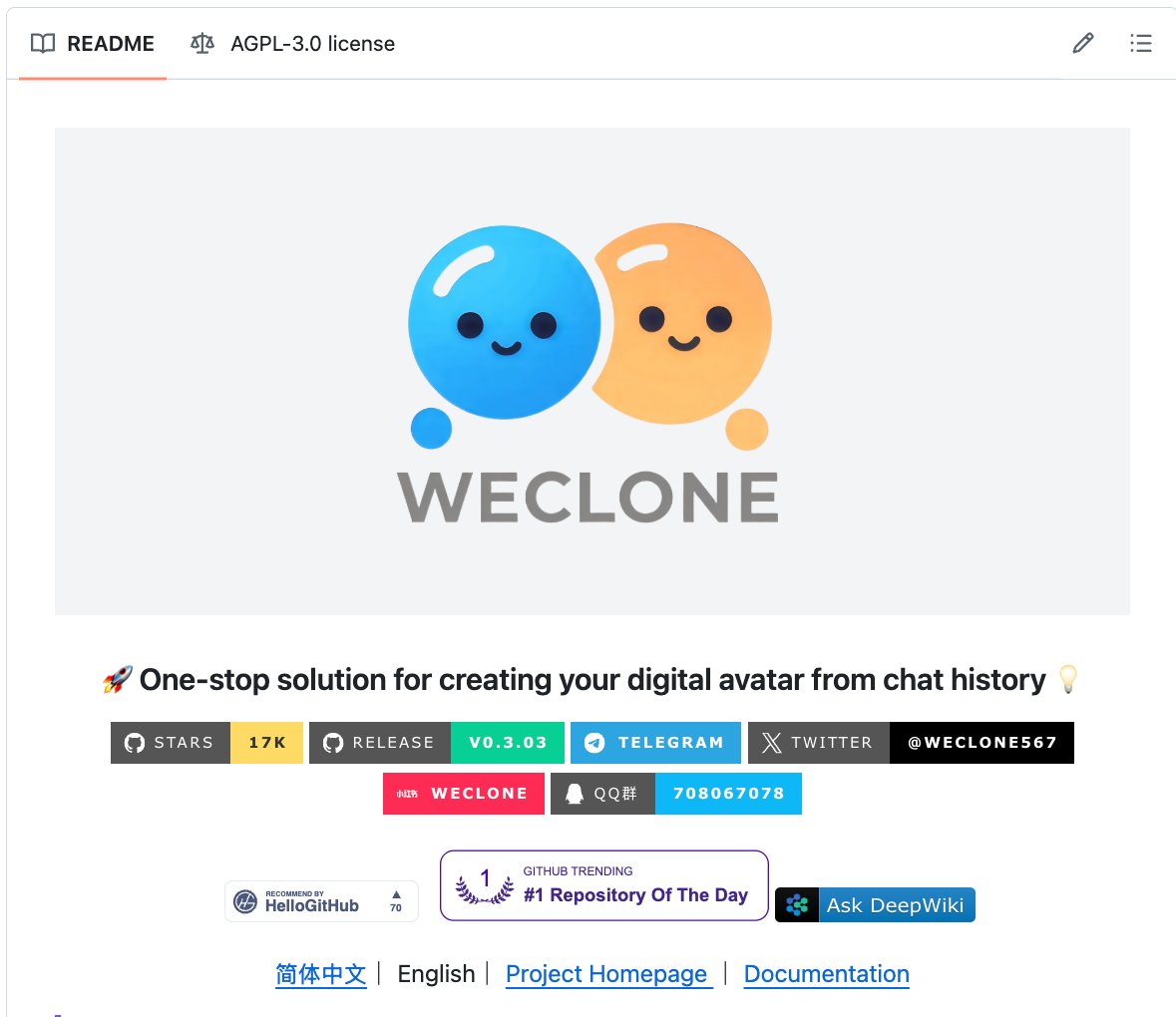
Nav Toor describes WeClone, a self-hosted AGPL-3.0 project with about 16,400 GitHub stars that exports chat logs, fine-tunes an LLM on a user's messages and binds it to a chatbot. The post presents it as a free alternative to commercial digital persona services.

Original post · 2 min read
Someone built a tool that reads all your chat messages and creates an AI clone of you. It talks like you. Responds like you. Thinks like you. 16,400 GitHub stars.

It's called WeClone.

Export your chat history. Feed it to the tool. It fine-tunes an AI model on YOUR messages. Your slang. Your humor. Your tone. Your personality. Then it binds to a chatbot and becomes you.

Not a generic chatbot with your name on it. An AI trained on thousands of YOUR actual conversations. It learns how YOU respond to questions, jokes, arguments, and small talk.

Here's how it works:

→ Export your chat logs from WeChat, Telegram, or any messaging app
→ WeClone processes and cleans the data automatically
→ Fine-tunes an LLM on your conversation style and patterns
→ Captures your unique vocabulary, tone, humor, and personality
→ Binds the trained model to a chatbot interface
→ Your digital twin is live. People can talk to "you" when you're not there.

Here's the wildest part:

Your friends text your AI clone. They can't tell it's not you.

It uses your actual phrases. It mirrors your response timing patterns. It knows how you react to specific topics because it learned from real conversations where you did exactly that.

This is not a parlor trick. This is digital identity preservation. Your grandchildren could talk to an AI version of you long after you're gone. Your personality. Your stories. Your humor. Preserved.

The AI twin industry is projected to be worth billions. Companies charge thousands for custom digital personas.

This is free. Self-hosted. Your data stays on your machine.

16.4K GitHub stars. 1.3K forks. 422 commits. AGPL-3.0 License.

100% Open Source.
♥ 1.6K · ⟲ 197 · 👁 109.9KView on X ↗

Field Theory CLI Adds Bookmark Folder Sync and Linux, Windows Support

GitHub - afar1/fieldtheory-cli: Field Theory CLI for bookmarks, Library, commands, and agent workflows

Andrew Farah announces version 1.3.5 of fieldtheory-cli, a tool for syncing X bookmarks locally for AI agents. New features include bookmark folder sync, full article sync and categorization, and support for Linux and Windows.

Original post · 1 min read
by popular request, fieldtheory-cli (v1.3.5) now supports:

› ft sync --folders (bookmark folders)
› folder list, search, focus
› full article sync + categorization
› linux and windows
› many fixes

full list: github.com/afar1/fieldtheory-cli

› npm install -g fieldtheory@latest
Andrew Farah @andrewfarah
sharing my first open source project

a CLI for downloading and syncing your X bookmarks locally so your agent can access them. it's free

› npm install -g fieldtheory
› login to your X account in a chrome tab
› ft sync (done!)

bonus:
› ft viz
› ft classify
github.comGitHub - afar1/fieldtheory-cli: Field Theory CLI for bookmarks, Library, commands, and agent workflowsField Theory CLI for bookmarks, Library, commands, and agent workflows - afar1/fieldtheory-cli
♥ 223 · ⟲ 10 · 👁 19.7KView on X ↗

Trader Credits Claude Code and Open-Source Repos for Polymarket Gains

Trader Credits Claude Code and Open-Source Repos for Polymarket Gains▶

A trader claims an ex-Anthropic engineer advised pairing Claude with code repositories, and says he connected Claude Code to a 86-million-trade Polymarket dataset to build trading detectors. The post links to Anthropic's cookbook repo and a copytrading page, and includes an unverified profit claim.

Original post · 1 min read
An ex-Anthropic engineer told me something at a party he probably shouldn't have.

It was in SF. Someone's rooftop. I mentioned I run trading agents on Claude. He went quiet.

"You're doing it wrong. Everyone is"

I asked what he meant.

"Claude is a runtime. Not a chatbox. You're supposed to pair it with repos"

He pulled out his phone. Opened one GitHub link.

github.com/anthropics/anthropic-cookbook

14,000 stars. Every workflow pattern they built internally before it went public.

Agents. Tool use. Evals. Citations. The entire architecture.

"Everyone types prompts. That's not how we use it. You connect Claude to a codebase. It reads. It understands. It builds on top of what's already there"

I went home at 2am. Connected Claude Code to poly_data - 86 million Polymarket trades. Every wallet. Every entry.

Claude didn't guess. It read the data and built detectors.

First week: +$1,400.
Second week: +$3,800.
Right now: +$9,100. 4 agents. 74% win rate.

His team runs this with a floor of PhDs and $800M AUM.

My setup: Claude + a VPS. $25/month. The repos are free.

Copytrade here: kreo.app/@lunar

I asked him what separates his firm from everyone else.

"Honestly? Keyboard shortcuts and repo structure. That's it. The model is the same for everyone"

He texted me two days later.

"Delete everything I told you"

Too late.
Hanako @hanakoxbt
12 Claude Shortcuts That Slashed My Workflow in Half. Here's the Full List. — Whether you opened Claude for the first time last week or you've been shipping with it daily since launch - there's something here you're not using.
I spent a week tracking every click, every menu
♥ 4.0K · ⟲ 303 · 👁 1.7MView on X ↗

Developer Lists Five Agent Skill Packs for Swift and Xcode Projects

Install These Skills Before Codex Touches Your Xcode Project

iOS developer Paul Solt recommends installing community skill packs before letting Codex or Claude Code work on Xcode projects, citing deprecated code and compiler errors as common agent failures. The packs come from Paul Hudson, Antoine van der Lee, Thomas Ricouard and others, covering SwiftUI, concurrency, testing and build optimization.

Original post · 6 min read
X ArticleInstall These Skills Before Codex Touches Your Xcode Project
I've been building iOS and macOS apps with Codex and Claude Code since last year. One thing I've learned: agents need simple systems that produce reliable results.
Without the right skills, agents write deprecated code, create compiler errors, and waste your time debugging their mistakes. These 5 skill packs fix that. Each one comes from a developer who's been shipping real apps with agents.
1. Paul Hudson: The Swift Foundation

If you've learned Swift online, you've probably read Paul Hudson's work (@twostraws). His agent skills come from a decade of teaching Swift through Hacking with Swift — and his SwiftUI rules help correct common mistakes with agents.
I met Paul at try! Swift in NYC and we spent some time together in the SwiftUI labs at WWDC 2019. He's a prolific writer and digs in deep so you can understand what works.

These skills will jumpstart your agents:
SwiftUI Pro: modern SwiftUI APIs, view composition, state management
Swift Concurrency Pro: async/await, actors, Sendable, Swift 6 migration
Swift Testing Pro: Test macros, parameterized tests, XCTest migration
SwiftData Pro: models, queries, migrations, CloudKit sync
He also maintains the canonical directory of every community Swift skill.
2. Antoine van der Lee: SwiftLee

Antoine van der Lee (@twannl) runs SwiftLee — one of the most widely read Swift blogs. He has 5 skill repos, each with detailed reference docs. His Xcode Build Optimization skill stands out — 6 sub-skills for build settings and compilation times to make your code build faster.
SwiftUI Expert: state management, view composition, performance, Liquid Glass
Swift Concurrency: actors, Sendable, data race safety, Swift 6 migration
Swift Testing Expert: modern testing patterns, XCTest migration, parameterized tests
Core Data Expert: stack setup, fetch requests, background contexts, migrations
Xcode Build Optimization: 6 sub-skills for build settings, compilation times, project config
The Xcode Build Optimization skill is a powerful tool that can make both you and your agents more productive. And if you want a better workflow with the iOS Simulator, check out his developer app: @rocketsim_app
3. Thomas Ricouard: Codex Expert

Thomas Ricouard (@Dimillian) built Codex Monitor — the open source macOS app for managing multiple Codex agents — and then joined OpenAI's Developer Experience team.
His skills now ship as the official Codex Build iOS App and Build Mac App plugins. These automatically update with each new release of the Codex app or Codex CLI.
Build iOS Apps plugin
SwiftUI Liquid Glass: iOS 26+ Liquid Glass APIs, modifier ordering, fallbacks
SwiftUI UI Patterns: navigation, sheets, app wiring, reusable components
SwiftUI Performance Audit: invalidation storms, identity churn, layout thrash
SwiftUI View Refactor: smaller subviews, MV-style data flow, Observation
iOS Debugger Agent: simulator build/run/debug with XcodeBuildMCP
iOS App Intents: Siri, Shortcuts, widget integration
Build macOS Apps plugin adds AppKit interop, packaging/notarization, signing/entitlements, window management, and SwiftPM workflows.
You can dig into the source for both of these plugins at the Official OpenAI Plugins repo,
4. Krzysztof Zabłocki: Advanced Swift + Tooling

Krzysztof Zabłocki (@merowing_) created Sourcery — the Swift metaprogramming tool used by 40,000+ apps including Airbnb and The New York Times. His open source tools power over 80,000 apps total.
His approach to agent skills is completely different. Instead of individual skill files, he built a rules-based system over 3 years of daily LLM use — 12 domain-specific rule files with a smart loader that uses LLM self-reflection to decide which rules to apply based on context. The system is tool-agnostic: same rules work in Cursor, Claude Code, and Codex.
What I like about his approach: he has a progressive documentation reading CLI tool to offload search and make it agent-friendly. He also created Inject for hot Swift reloading — useful for fast prototyping when you want to see UI changes without rebuilding.
Read his guide: Stop Getting Average Code from Your LLM
You can grab two agent friendly files that follow his coding philosophy:
general.md: primary directive and coding standards
rule-loading.md: smart loader that selects rules by context
The full 12-file set covering dependency injection, SwiftUI architecture, ViewModel coordination, and Swift Testing is part of his Swifty Stack course.
5. AppCreator: Agent-Friendly Build Tools
None of the skills above matter if your agent can't build and test your code.
Xcode build output is verbose. Test output is worse. We're juggling XCTest and Swift Testing with two different build systems. Agents choke on this.
I built AppCreator to solve that problem. It scaffolds Xcode projects with agent-friendly defaults. I created it to quickly prototype new app ideas that used the same workflow as my existing projects.
Adopt the skill for your existing apps and it will help your agent make a build … continue on X ↗
♥ 2.6K · ⟲ 187 · 👁 1.7MView on X ↗

Aakash Gupta Proposes Shared Claude Code Repo as Product Manager Operating System

Aakash Gupta Proposes Shared Claude Code Repo as Product Manager Operating System▶

Product writer Aakash Gupta argues PMs should build a shared 'Team OS' repository with a .claude folder, function-specific folders and a CLAUDE.md doc index so every team role can query context. He frames it as a way for PMs to stop being the coordination bottleneck, and links to a video on the approach.

Original post · 2 min read
The PM job used to be about holding context across your team. Now your team is 3x bigger, every role makes product decisions, and engineers are shipping without you.

The PMs who figured this out stopped being the context node. They built one.

A PM used to support 3-4 engineers. Now it's 10+ engineers, plus sales, marketing, support, and design. You cannot manually hold context at that ratio. The math breaks. So the best PMs are building what amounts to a Team Operating System: a single repo where every role on the team queries shared context directly.

The architecture is simpler than you'd expect. A .claude folder with shared agents, commands, and skills. A product development folder with subfolders for each function. A team folder for onboarding and retros. And a CLAUDE.md at the root with a doc index that tells Claude how to navigate the entire repo.

The doc index is the part worth paying attention to. It means anyone on the team can ask a natural language question and get answers from across every function's context. The new designer asks about pricing strategy and gets the answer from the product development folder. The engineer asks about a customer pain point and gets it from support docs. No PM meeting required.

This is the PM version of what happened to middle management in the 2010s. Collaboration tools made it possible for ICs to coordinate without managers as intermediaries. Team OS does the same thing to the PM's coordination function.

The PM who only coordinates is the PM this ratio will crush.
Build the system that replaces you as the bottleneck.
Aakash Gupta @aakashgupta
Every team at your company should be creating their own 'Team OS' in Claude Code on Github. Here's how:

1:45 - What is a Team OS
13:37 - Shared skills and commands
25:24 - Shared team automations
59:50 - The learning flywheel
♥ 119 · ⟲ 7 · 👁 27.5KView on X ↗

Aakash Gupta Ranks Anthropic's 120 Claude Features From Q1 2026

Aakash Gupta describes how Claude Code spread through Anthropic's offices, beginning with a data scientist's terminal workflow, and links to a ranked list of more than 120 Anthropic features shipped in 90 days. The list sorts features into tiers and suggests workflows.

Original post · 1 min read
Boris walked into the Anthropic office one day and saw a data scientist running SQL queries with ASCII visualizations in a terminal using Claude Code.

The next week, the entire row of data scientists had Claude Code open. Then half the sales team. Then finance.

He calls this latent demand. People already want to build things. They already want to query their own data, automate their own workflows, prototype their own tools. The desire was always there. The friction was the barrier.

The adoption curve for AI tools doesn't look like a product launch. It looks like a virus moving through an open office. One person figures it out, the person sitting next to them sees the screen, and by Friday the whole floor has it installed.
Aakash Gupta @aakashgupta
Anthropic shipped 120+ features in 90 days across Claude Code, Cowork, and Claude.

I ranked every single one.

S tier, A tier, B tier, C tier, D tier. What to adopt now, what to skip, and 4 workflows that chain them together:

🔗 news.aakashg.com/p/anthropic-q1-features
♥ 257 · ⟲ 22 · 👁 57.7KView on X ↗

Zara Zhang Releases Personalized Podcast Skill That Turns Anything Into Audio

Zara Zhang Releases Personalized Podcast Skill That Turns Anything Into Audio▶

Zara Zhang introduces a skill that converts content into a two-host AI podcast published as an RSS feed, and says she remixes her meeting transcripts into episodes. The post includes a demo video and a link.

Original post · 1 min read
Introducing the Personalized Podcast skill: Turn anything into a podcast with 2 AI hosts, publish it as an RSS feed, and listen to the show in your favorite podcast app on the go

I've been remixing my meeting transcripts into podcasts where the AIs "eavesdrop" on my conversation & comment on their impression of me. It's insane

This is the age of "content for one"

Link below
♥ 461 · ⟲ 45 · 👁 34.3KView on X ↗

Farza Open-Sources Clicky on GitHub

GitHub - farzaa/clicky

Farza announces that his project Clicky is now open source and links to its GitHub repository. The post gives no further detail on what the project does.

Original post · 1 min read
Now open-source.

Go build.

github.com/farzaa/clicky
github.comGitHub - farzaa/clickyContribute to farzaa/clicky development by creating an account on GitHub.
♥ 238 · ⟲ 7 · 👁 30.2KView on X ↗

VC Ryan Sarver Details Building an AI Chief of Staff on OpenClaw

How I built a chief of staff on OpenClaw that's better than any human I've hired

Venture investor Ryan Sarver writes up how he built an AI chief of staff on OpenClaw with a markdown-based memory layer and a continuous improvement loop. He offers to open source the system if there is enough interest.

Original post · 12 min read
X ArticleHow I built a chief of staff on OpenClaw that's better than any human I've hired
I'm a VC in the middle of a fundraise, sitting on boards, helping portfolio companies, and angel investing on the side. I've worked with great human EAs and chiefs of staff over the years, so I know what high-leverage support actually looks like. When the first AI APIs came out, I tried to build an AI version of that as a product and couldn't make it work.
When OpenClaw launched I went deep immediately and haven't stopped. I have helped a number of friends set it up and each of them have asked what I have done to configure it and super power it. @ryancarson's post (link in the comments) about how he built his OpenClaw assistant was also great to see, and the response to it convinced me to finally write up what I've been building.
What I have now is more capable than any human chief of staff I've ever worked with. It never forgets a commitment, it handles the small stuff without being asked, flags the important stuff without being told, and it gets better every week. Plus it never sleeps and it never tires. There are still some bumps, but less and less each week.
If any of this is interesting, let me know. If there's enough interest I'll package the whole system up and open source it.
What makes a great chief of staff?
Before I walk through what I've built, it's worth thinking about what a great chief of staff actually does. Not the job description, the real leverage. The best ones I've worked with filtered the noise so only the right things reached me, made sure I walked into every meeting prepared and that nothing fell through after, kept the full picture of what was in flight and flagged what was slipping, tracked relationships and knew where things stood with every important person, and created the daily and weekly rhythm that kept everything moving.
Her name is Stella. She handles all of these, and I'll walk through each one below. But the two things that make my setup genuinely different from other OpenClaw builds are the memory layer underneath it all and the continuous improvement loop that makes the system get better every week. I want to start there because they're what make everything else compound.
Memory: the foundation
Session memory is a lie. Any assistant that treats conversation history as its working context will fail you at the most frustrating moments.
I built two layers. The first is daily notes: one markdown file per day (memory/YYYY-MM-DD.md) serving as a raw log of everything that happened. Meetings attended, decisions made, tasks added and completed, context that came up in conversation. A script called pulls from my sessions throughout the day and writes these automatically.
The second is long-term memory in MEMORY.md, curated by Stella herself. Key people, active projects, lessons learned, decisions made. She periodically synthesizes this from the daily notes, and it's what she reads on startup to orient herself on what matters right now.
Every meeting processed, every email triaged, and every task tracked feeds back into this picture continuously. Without this layer you have a capable assistant with amnesia. With it you have something closer to a person who's been working alongside you for months and never forgets anything.
I've also come to really value that all of this lives in flat markdown files rather than a database. I can open any memory file, read it, edit it if something's wrong, and understand exactly what the assistant knows. I can back the whole thing up to git and restore anything instantly. There's no abstraction layer between me and the assistant's understanding of my world, which means I trust it more and fix things faster when they're off.
Here's where the layers really come together. I'm managing a fundraise involving 100+ LP contacts across multiple countries. Stella tracks the full pipeline, keeps context on each LP and contact, and knows where every relationship stands. For first meetings, I've created a rule that she researches the fund and any recent content they or their partners have published, then preps me with what she found, how it maps to our thesis, and tailored talking points as part of the pre-meeting brief. For ongoing relationships, she knows exactly where they are in the pipeline, what was discussed and committed in our last meeting, and what the key issues are. You can't automate something as critical as a fundraise, but having this kind of structure underneath it means I'm spending my time on the conversations themselves rather than managing the process around them.
Kaizen: the system improves itself
This might be my favorite part, and the thing that makes it feel genuinely different from any assistant I've worked with, human or AI.
Every Friday, a cron job runs research. Stella scans the OpenClaw community, checks for new patterns, looks at what other builders are doing, and saves findings to `memory/kaizen-research-YYYY-MM-DD.md`. On Sunday morning we review it together. She summarizes the week's research, surfaces the top ideas worth tryi… continue on X ↗
♥ 2.2K · ⟲ 215 · 👁 1.2MView on X ↗

X Releases MCP Server, Jon Oringer Shares Setup Guide for OpenClaw

GitHub - xdevplatform/xmcp: MCP server for the X API

Jon Oringer shares steps to connect X to the OpenClaw agent using X's newly released XMCP server, which is hosted on GitHub. The guide covers OAuth setup, a tool allowlist for safety, and test prompts.

Original post · 2 min read
This is huge : @X released an MCP server today..

How to Connect X to your 🦞 :

**Step 1: Run the XMCP Server**

git clone github.com/xdevplatform/xmcp.git
cd xmcp
cp env.example .env

Edit the .env file with your X OAuth consumer key and secret. Set the callback URL to 127.0.0.1:8976/oauth/callback in your X Developer app.

For safety, add an allowlist such as:
X_API_TOOL_ALLOWLIST=searchPostsRecent,createPosts,getUsersMe,getPostsById,likePost,repostPost

Then run:
python -m venv .venv && source .venv/bin/activate
pip install -r requirements.txt
python server.py

The server will be available at 127.0.0.1:8000/mcp. Complete the OAuth flow on first run and keep this process active.

**Step 2: Add XMCP in @OpenClaw**

Use the following command:

openclaw mcp set x '{
"url": "127.0.0.1:8000/mcp&quot;
}'

Verify with:
openclaw mcp list
openclaw mcp show x

**Step 3: Test the Integration**

Restart the OpenClaw agent or reload MCP configuration if required.

Test by sending these prompts to OpenClaw in your chat app:
- Search recent posts about MCP on X and summarize the top trends
- Draft and post this thread on X
- Get my X profile information
- Like the latest post from @xdevplatform

OpenClaw will use the XMCP tools automatically when relevant.

**Key Benefits**

- OpenClaw provides persistent memory and works across multiple messaging platforms.
- XMCP delivers standardized access to X API functionality.
- Combined, they enable an agent that can research trends, post content, engage with posts, and report results within your existing chat workflows.

**Safety and Configuration Notes**

Start with a minimal tool allowlist in the XMCP .env file. Expand gradually after testing.
The allowlist can be updated and requires restarting the XMCP server.
Monitor logs in both the XMCP server and OpenClaw for troubleshooting.
X actions performed by the agent are public.

XMCP repository: github.com/xdevplatform/xmcp
OpenClaw MCP documentation: docs.openclaw.ai/cli/mcp
github.comGitHub - xdevplatform/xmcp: MCP server for the X APIMCP server for the X API. Contribute to xdevplatform/xmcp development by creating an account on GitHub.
♥ 2.0K · ⟲ 208 · 👁 312.2KView on X ↗

Andrew Farah Releases Fieldtheory CLI to Sync X Bookmarks Locally

Andrew Farah Releases Fieldtheory CLI to Sync X Bookmarks Locally▶

Andrew Farah shares his first open source project, a free CLI called fieldtheory that downloads and syncs X bookmarks locally so an agent can access them. The post shows install and sync commands plus viz and classify features.

Original post · 1 min read
sharing my first open source project

a CLI for downloading and syncing your X bookmarks locally so your agent can access them. it's free

› npm install -g fieldtheory
› login to your X account in a chrome tab
› ft sync (done!)

bonus:
› ft viz
› ft classify
♥ 4.3K · ⟲ 271 · 👁 556.4KView on X ↗

Andrej Karpathy Shares Idea File for Building LLM Knowledge Bases

Andrej Karpathy publishes a gist describing an 'idea file' approach, where an agent builds a personal LLM wiki from shared concepts rather than shared code. The post builds on his earlier thread on using LLMs to compile markdown knowledge bases from raw sources.

Original post · 1 min read
Wow, this tweet went very viral!

I wanted share a possibly slightly improved version of the tweet in an "idea file". The idea of the idea file is that in this era of LLM agents, there is less of a point/need of sharing the specific code/app, you just share the idea, then the other person's agent customizes & builds it for your specific needs.

So here's the idea in a gist format: gist.github.com/karpathy/442a6bf555914893e9891…

You can give this to your agent and it can build you your own LLM wiki and guide you on how to use it etc. It's intentionally kept a little bit abstract/vague because there are so many directions to take this in. And ofc, people can adjust the idea or contribute their own in the Discussion which is cool.
Andrej Karpathy @karpathy
LLM Knowledge Bases

Something I'm finding very useful recently: using LLMs to build personal knowledge bases for various topics of research interest. In this way, a large fraction of my recent token throughput is going less into manipulating code, and more into manipulating knowledge (stored as markdown and images). The latest LLMs are quite good at it. So:

Data ingest:
I index source documents (articles, papers, repos, datasets, images, etc.) into a raw/ directory, then I use an LLM to incrementally "compile" a wiki, which is just a collection of .md files in a directory structure. The wiki…
♥ 26.8K · ⟲ 2.8K · 👁 7.3MView on X ↗

Ruben Recommends Superpowers Brainstorming Skill for Creative Work

brainstorming — obra/superpowers

Ruben replies to Paul Solt that he uses the brainstorming skill from the obra/superpowers repository on skills.sh. The skill is meant to be used before creative work such as building features or modifying behavior, to explore user intent.

Original post · 1 min read
@PaulSolt I use brainstorming all the time

skills.sh/obra/superpowers/brainstorming
skills.shbrainstorming — obra/superpowersYou MUST use this before any creative work - creating features, building components, adding functionality, or modifying behavior. Explores user intent,…
♥ 119 · ⟲ 4 · 👁 34.1KView on X ↗

Addy Osmani Releases Open-Source Agent Skills for Coding Agents

Addy Osmani Releases Open-Source Agent Skills for Coding Agents

Addy Osmani of Google released Agent Skills, 19 engineering skills and 7 slash commands that enforce specs, tests, and reviews for coding agents including Claude Code and Cursor. The project is free, open source, and installable via npx.

Original post · 1 min read
🚨 You need to see this.

@addyosmani from Google just dropped his new Agent Skills and it's incredible.

It brings 19 engineering skills + 7 commands to AI coding agents, all inspired by Google best practices 🤯

AI coding agents are powerful, but left alone, they take shortcuts.

They skip specs, tests, and security reviews, optimizing for "done" over "correct." Addy built this to fix that.

Each skill encodes the workflows and quality gates that senior engineers actually use: spec before code, test before merge, measure before optimize.

The full lifecycle is covered:

→ Define - refine ideas, write specs before a single line of code
→ Plan - decompose into small, verifiable tasks
→ Build - incremental implementation, context engineering, clean API design
→ Verify - TDD, browser testing with DevTools, systematic debugging
→ Review - code quality, security hardening, performance optimization
→ Ship - git workflow, CI/CD, ADRs, pre-launch checklists

Features 7 slash commands: (/spec, /plan, /build, /test, /review, /code-simplify, /ship) that map to this lifecycle.

It works with:
✦ Claude Code
✦ Cursor
✦ Antigravity
✦ ... and any agent accepting Markdown. Baking in Google-tier engineering culture (Shift Left, Chesterton's Fence, Hyrum's Law) directly into your agent's step-by-step workflow!

`npx skills add addyosmani/agent-skills`

Free and open-source.

Repo link in 🧵↓
♥ 2.5K · ⟲ 339 · 👁 423.0KView on X ↗

Paul Solt Shares Workflow for Building Apps With Codex Sans Xcode

How I Build Apps With Codex Without Opening Xcode

iOS developer Paul Solt describes an Agent Skill called AppCreator and a Makefile-based workflow using xcbeautify so Codex can build, test, and run iPhone and Mac apps with clean pass/fail output.

Original post · 6 min read
X ArticleHow I Build Apps With Codex Without Opening Xcode
Do you want to build iOS or macOS apps with Codex?

I have a new Agent Skill that will help you make apps. Without this skill you're going to waste a lot of time. Let me explain.
I was building a Dangerous Spider app with Codex when I noticed the agent kept missing its own build and test failures. It was looking at the wrong status codes. It genuinely couldn't find the error and would say everything worked (when it didn't).
Xcode compiler build output is extremely verbose. Actual errors get buried in thousands of lines of text. Trying to find an error in Xcode build output is like finding a needle in a haystack.

When you layer in agents, you're wasting time and context by asking them to find the errors.
Agents need to know what worked and what didn't work. It needs to be pass/fail, so I created an agent-designed workflow to do just that.
Here's the 7-step workflow I use every day:
1. Make Xcode Projects Agent Friendly with AppCreator
I built an Agent Skill called AppCreator. Run it once, and it scaffolds a new Xcode project or retrofits an existing one. Now your project is agent-ready.

At the heart of it: a `Makefile` wraps the CLI `xcodebuild` commands using xcbeautify. Clean, readable output from Xcode app builds and tests. The agent sees what failed, fixes it, and moves on. No verbose output to search. It works for iPhone and Mac apps.
Download and install the AppCreator Skill to make your app project agent-friendly.
2. make Is the Only Build Command I Use
The skill is designed so that one command builds and runs your app:
make

Your agent knows how to work with Makefiles, so this is just the starting point. You can extend it however you want.
I ask agents to set the default action to "build-and-run", and to use special build scripts so the freshly built app is always relaunched, just like Xcode.
In Codex CLI, type "make" to check the agent's work.
In the Codex app, set up a custom run action: Click on the Play button and set it to: make.

Finding the setting later requires a few more steps: Go to Environments → Project → View → Edit Local Actions → Actions → Set Action Script to `make`.

With a Makefile, you have a fast, repeatable way to build and run your apps (via the up-arrow on the CLI or the Run button in the Codex app).
3. Just Talk to It
If you want to get good results, you need to actively steer your agent.
Agents are good, but they'll do things you don't want, and the only way to prevent that is to steer the ship as they work.
I frequently double-check the work and redirect when I see agents doing the wrong thing.
I use Wispr Flow to talk out loud — describe what I want, how it should behave, what needs to change. After an agent hands back work, I start Wispr Flow as I play-test the new changes. This gives me the chance to talk through what works and what doesn't, and then, when I'm done, I can paste the transcript directly into the Codex app.
Plan mode is helpful for sparking thoughts about how features and edge cases. However, I have found that the plan mode isn't good enough.

Instead, I would use plan mode to help you think through the feature as a starting point. Use it to spark discussion so you can refine which features you actually build.
Software is nuanced, and if you take it feature by feature, you're going to get better software in the end.
4. Tests Keeps Agents Accountable
Without tests, agents can get sloppy. Tests allow agents to catch their own mistakes.
Ask Codex to write unit tests as it builds. Your goal is fast tests. UI tests are helpful for verification, but they can be annoying and slow to run. I like to have agents use UI tests to catch errors that are impossible to test with unit tests alone.

My recommendation is that you separate your tests into at least two targets:
make test
make ui-test
When an agent runs UI tests, it takes over your machine, which can be disruptive if you need to do anything else (This is where having a second Mac can be useful).
UI tests will slow everything down, so it's best to test them only at hand-off points. When your agent has wrapped up one task or several tasks. Don't do full regression testing for incremental work; instead, ask the agent to test only the smallest subset to verify their work and remain fast.
Have your agents read this article from Peter Steinberger, @steipete: Running UI Tests on iOS With Ludicrous Speed. Using that, you can help keep your test suite from becoming a bottleneck.
5. Log Runtime Results
Another indispensable tool is the use of logs and app artifacts. Have your agent add logging to your app. This gives it another tool for seeing what went wrong in real time.
Agents can stream development logs to a file or read them in real time to fix problems that are not immediately obvious.

When my agent repeatedly fails to complete a task properly, I know it's time to introduce more detailed logs.
Just ask your agent:
Please add verbose logs around XYZ so that you can see what is happening and fix the… continue on X ↗
♥ 810 · ⟲ 76 · 👁 467.5KView on X ↗

Open-Multi-Agent Framework Reimplements Claude Code Orchestration Patterns

Open-Multi-Agent Framework Reimplements Claude Code Orchestration Patterns

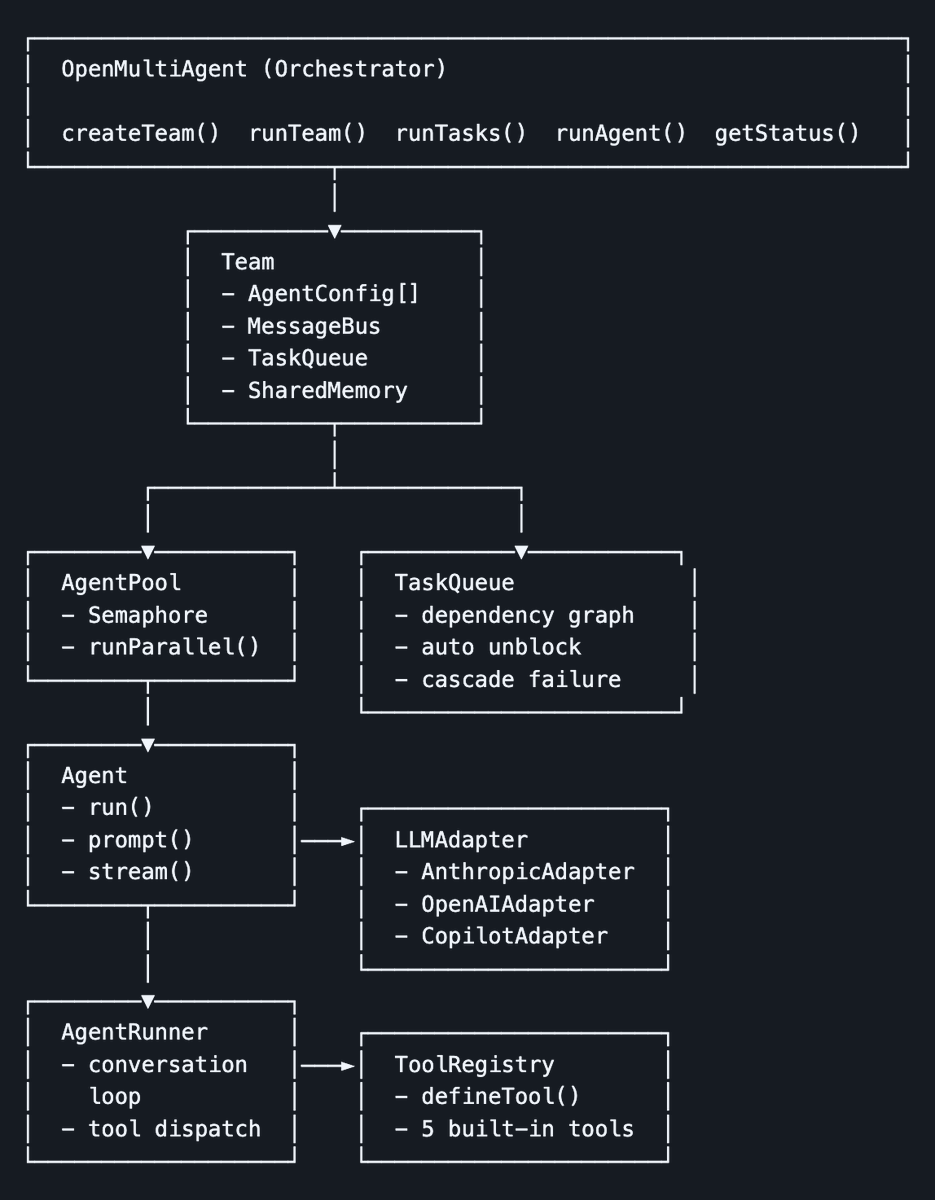
Ivan Burazin highlights an open-source, model-agnostic multi-agent framework built from scratch by a former PM after the Claude Code source leak, with in-process orchestration deployable to serverless, Docker, or CI/CD.

Original post · 1 min read
After the Claude Code source code leak, a former PM extracted its multi-agent orchestration system into an open source model agnostic framework.

He studied the architecture, focused on the multi-agent orchestration layer (the coordinator that breaks goals into tasks, team system, message bus, task scheduler with dependency resolution), and reimplemented these patterns from scratch as a standalone open source framework without infringing on Anthropic's code.

The result is what @JackChen_x calls an "open-multi-agent." Unlike claude-agent-sdk, which spawns a CLI process per agent, this runs entirely in-process and can be deployed anywhere (serverless, Docker, CI/CD)

Check it out: github.com/JackChen-me/open-multi-agent
♥ 3.4K · ⟲ 538 · 👁 555.9KView on X ↗

Cathryn Open-Sources Ops Toolkit for Keeping OpenClaw Running

Cathryn releases openclaw-ops, a set of open-source scripts that repair gateway issues, watch and restart the gateway, check configuration health, scan for security gaps, and audit third-party ClawHub skills.

Original post · 1 min read
🦞 openclaw-ops

tired of babysitting your OpenClaw?

I just open-sourced my ops layer. It fixes the gateway, exec approvals, broken crons, stuck sessions, channel issues, and security gaps.

• heal.sh — one-shot fix for the most common gateway issues (auth, exec approvals, crons, stuck sessions)
• watchdog.sh — runs every 5 min, restarts gateway if down, escalates after 3 failures
• watchdog-install.sh — installs the watchdog as a macOS LaunchAgent so it survives reboots
• check-update.sh — detects version changes, explains what config broke and why; --fix to auto-apply
• health-check.sh — declarative URL/process checks for gateway-adjacent services and workers
• security-scan.sh — config hardening score (0–100), drift detection, credential scan
• skill-audit.sh — static audit for third-party ClawHub skills before you install them

basically everything I built for myself since January to stop me from tearing my hair out 💀

link below 🫶
Cathryn @cathrynlavery
🦞 Openclaw update fix

If your agents are hitting exec approval walls after the latest update, the fix is three settings:

In exec-approvals.json defaults:
- security: "full"
- ask: "off"
- askFallback: "full"

In openclaw.json:
- tools.exec.security: "full"
- tools.exec.strictInlineEval: "false"

Then restart gateway.

The allowlist wildcard * alone isn't enough. There's a second policy layer that gates complex commands independently.
♥ 559 · ⟲ 44 · 👁 104.0KView on X ↗
Cursor Launches Version 3 Built for Agent-Written Code

Cursor Launches Version 3 Built for Agent-Written Code▶

Cursor announces Cursor 3, pitched as simpler and more powerful and designed for a world where code is written by agents while retaining the depth of a development environment. The post is a video announcement.

Original post · 1 min read
We’re introducing Cursor 3. It is simpler, more powerful, and built for a world where all code is written by agents, while keeping the depth of a development environment.
♥ 10.1K · ⟲ 972 · 👁 2.9MView on X ↗

Alibaba Open-Sources Flyai Skill Bringing Travel Search to Coding Agents

Alibaba Open-Sources Flyai Skill Bringing Travel Search to Coding Agents

Tom Dörr shares a GitHub repository from Alibaba, flyai-skill, which adds travel search capabilities inside AI coding agents. The project is an open-source agent skill that developers can contribute to.

Original post · 1 min read
Travel search inside AI coding agents

github.com/alibaba-flyai/flyai-skill
github.comGitHub - alibaba-flyai/flyai-skill: fly ai agent skillfly ai agent skill. Contribute to alibaba-flyai/flyai-skill development by creating an account on GitHub.
♥ 495 · ⟲ 47 · 👁 29.0KView on X ↗

Google Stitch Adds Prompt Enhancer and Design Tips for Better Results

Google Stitch Adds Prompt Enhancer and Design Tips for Better Results▶

Stitch by Google thanks users after its launch and shares guidance on prompting, including a new prompt enhancer under the plus menu. The post outlines tips on intent, design language and color hierarchy, with a video walkthrough by David East.

Original post · 1 min read
We are completely humbled by the amazing response to our launch last week! 🫶 Now, we want to help you get the absolute best results from Stitch.

In this new video, David East walks you through how to consistently get premium results.

We also launched a new prompt enhancer (located under ‘+’ menu) to help you quickly collaborate on your vision before you submit your first prompt.

Stitch doesn't replace the design process—it is a tool for fast exploration and refinement, which is most effective when you step into the role of Creative Director.

Here are David's top strategies for taking your designs from generic to amazing:

🧠 Start with Intent: Define exactly who the design is for and how you want them to feel before you start building.

🎨 Enhance your prompt: You can use the new prompt enhancer (under the ‘+’ button’) to teach you design language and swap abstract words like "sporty" for tangible aesthetic descriptions like "high-end stationery" or "architectural limestone".

📐 Master Color Hierarchy: Treat colors as visual weight—Neutral for the canvas, Primary for ink, and Tertiary for your loudest accents.

Watch the full breakdown and see the transformation here👇images in 🧵
♥ 3.7K · ⟲ 312 · 👁 713.5KView on X ↗

Malicious Dependency Hits Axios Npm Package, Urging Immediate Version Pinning

Feross warns of an active supply chain attack in which axios@1.14.1 pulls in a newly created malicious package, plain-crypto-js, which acts as a dropper. He advises pinning versions and auditing lockfiles immediately, citing analysis from Socket AI.

Original post · 1 min read
🚨 CRITICAL: Active supply chain attack on axios -- one of npm's most depended-on packages.

The latest axios@1.14.1 now pulls in plain-crypto-js@4.2.1, a package that did not exist before today. This is a live compromise.

This is textbook supply chain installer malware. axios has 100M+ weekly downloads. Every npm install pulling the latest version is potentially compromised right now.

Socket AI analysis confirms this is malware. plain-crypto-js is an obfuscated dropper/loader that:

• Deobfuscates embedded payloads and operational strings at runtime
• Dynamically loads fs, os, and execSync to evade static analysis
• Executes decoded shell commands
• Stages and copies payload files into OS temp and Windows ProgramData directories
• Deletes and renames artifacts post-execution to destroy forensic evidence

If you use axios, pin your version immediately and audit your lockfiles. Do not upgrade.
♥ 16.0K · ⟲ 4.0K · 👁 12.5MView on X ↗

Open-Source Claude Code Configuration Bundles 27 Agents and 64 Skills

Open-Source Claude Code Configuration Bundles 27 Agents and 64 Skills

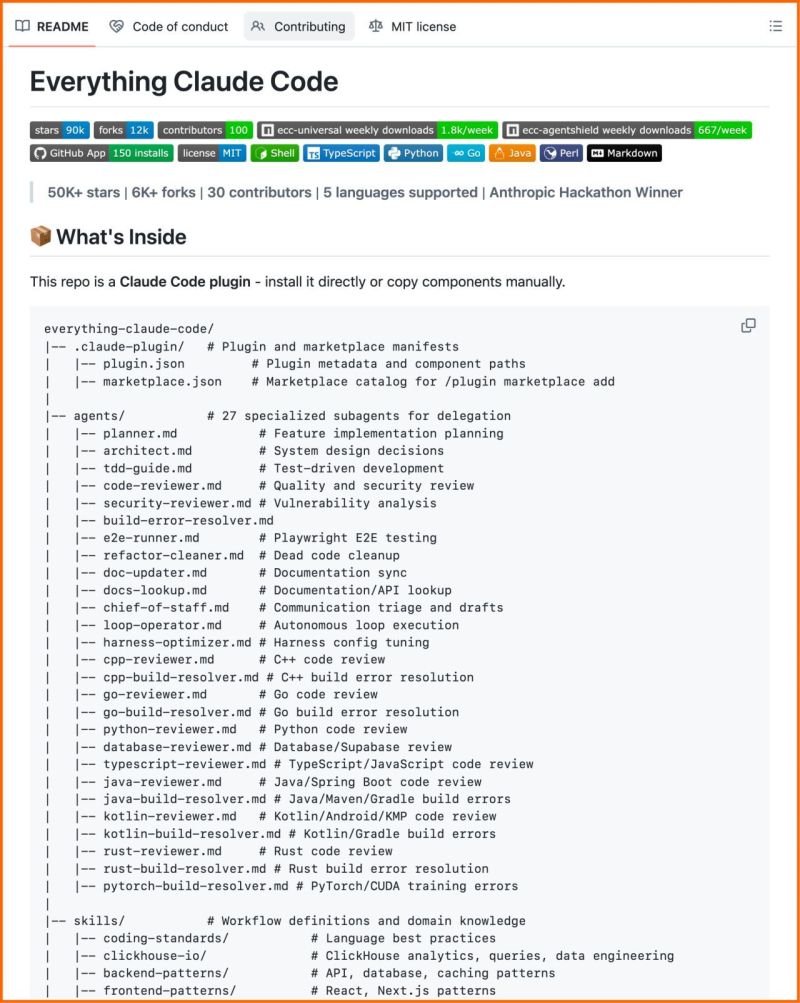
Alvaro Cintas promotes an open-source Claude Code setup from an Anthropic hackathon winner, containing 27 agents, 64 skills and 33 commands. The post also cites AgentShield with 1,282 security tests and a documented 60 percent cost reduction, compatible with several coding tools.

Original post · 1 min read
This is the most complete Claude Code setup that exists right now.
27 agents. 64 skills. 33 commands. All open source.

The Anthropic hackathon winner open-sourced his entire system, refined over 10 months of building real products.

What's inside:
→ 27 agents (plan, review, fix builds, security audits)
→ 64 skills (TDD, token optimization, memory persistence)
→ 33 commands (/plan, /tdd, /security-scan, /refactor-clean)
→ AgentShield: 1,282 security tests, 98% coverage

60% documented cost reduction.

Works on Claude Code, Cursor, OpenCode, Codex CLI. 100% open source.
♥ 6.9K · ⟲ 824 · 👁 639.2KView on X ↗

oh-my-claudecode Adds Multi-Agent Modes to Claude Code

oh-my-claudecode Adds Multi-Agent Modes to Claude Code

Hasan Toor promotes oh-my-claudecode, an open-source orchestration layer for Claude Code offering autopilot, parallel, swarm and pipeline modes with 32 specialized agents. The post claims 3-5x faster output and automatic model routing between Haiku and Opus.

Original post · 2 min read
🚨 Claude Code just got superpowers.

Someone built a multi-agent orchestration layer on top of Claude Code that gives it 5 execution modes, 32 specialized agents, and 3-5x faster output. Zero learning curve.

No new tools. No new subscriptions. Just Claude Code running like it was always meant to.

It's called oh-my-claudecode.

Here's what's inside:

→ Autopilot mode: fully autonomous execution, just describe the task and walk away
→ Ultrapilot mode: spins up parallel agents and runs 3-5x faster on multi-component builds
→ Swarm mode: coordinates multiple agents working independently toward the same goal
→ Pipeline mode: sequential chains for multi-stage processing tasks
→ Ecomode: token-efficient execution that saves 30-50% on costs without sacrificing quality

Here's what actually makes this different:

32 specialized agents for architecture, research, design, testing, and data science. Smart model routing uses Haiku for simple tasks and Opus for complex reasoning automatically. You never think about which model to use. The system decides.

One magic keyword and everything changes:

→ Type "autopilot" and it builds the whole thing autonomously
→ Type "ralph" and it goes into persistence mode, won't stop until the job is verified complete
→ Type "eco" and it switches to budget mode
→ Type "plan" and it runs a planning interview before touching a single file

The wildest part? It auto-resumes your Claude Code sessions when rate limits reset. No babysitting. No manually restarting. Just continuous execution.

3.6K GitHub stars. 100% Open Source.

Link in comments.
♥ 2.0K · ⟲ 256 · 👁 190.0KView on X ↗