Today, we’re launching WebMCP support for checkout, including Shop Pay, for all eligible Shopify merchants. I recently wrote that shopping with a browser agent is often slower and less reliable than doing it myself. The agent reads the page, finds an input, fills it, and reads the page again to figure out what changed. Then the agent does that again, and again, and again for every input. Sometimes, it even fills in the wrong information.
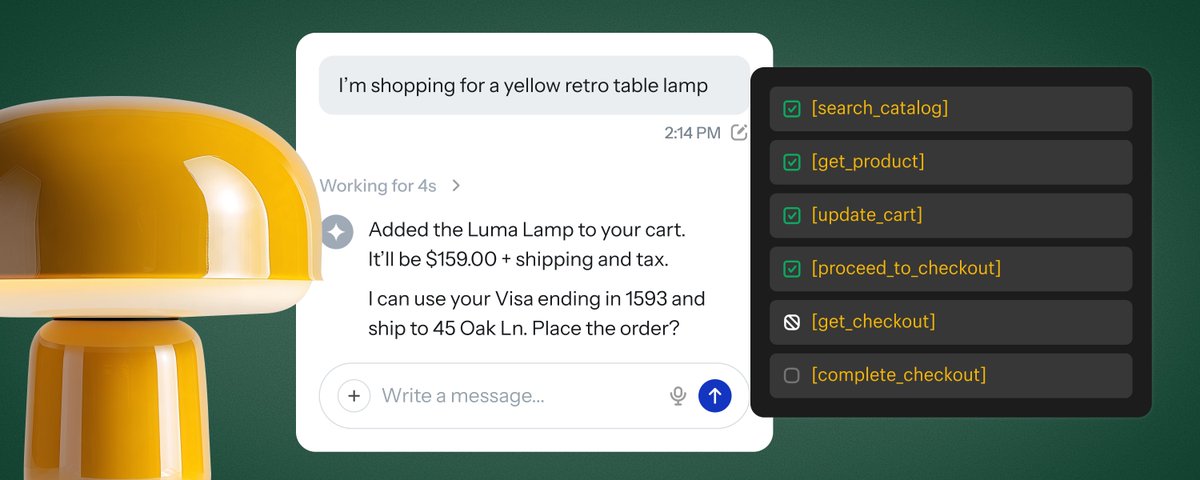
We already support WebMCP for storefronts and carts, so agents can search products, browse collections, and add items to a cart through structured tools. Now they can also read the checkout, update it, and submit it with the buyer’s authorization. From search to order, no screenshots or scraping required.
When should you use WebMCP?
Shopify exposes structured commerce APIs via the Universal Commerce Protocol (UCP), that enable agents to discover products, build carts, and checkout. UCP is the shared language that hosted MCPs and WebMCP both speak to. These are different access methods to the same protocol, to support wherever your agent runs.
Some agents work entirely server to server. Some work inside the buyer's browser. Some do both in one purchase, like an agent that builds a checkout through our APIs and moves into the browser when the buyer needs to review or verify something.
So here's my recommendation. If your agent can work without a browser, then go server to server, reach UCP through our hosted MCP endpoints, like Checkout MCP. It's the most efficient path, as it does not require loading and rendering pages and orchestrating a browser.
If your agent is operating in the buyer’s browser, use WebMCP tools provided on storefront and checkout to efficiently complete order placement, instead of navigating HTML built for humans. These WebMCP tools provide structured and efficient APIs, purposely designed — via UCP — to ensure accurate commerce facts, required disclosures, and handoff requirements.
A checkout interface built for agents
I’ve worked on checkout for years and I know that details matter. An address changes the available shipping options; a delivery choice changes the total, which may in turn affect discount eligibility and more; a merchant may require the buyer to accept terms before placing an order. An agent has to get these right.
With WebMCP, checkout surfaces tools with well-defined names, descriptions, and input schemas that capture the full fidelity of required inputs and context to negotiate a checkout. A browser agent can now discover those tools and call them in the buyer’s existing session.
There are three core tools:
get_checkout reads the current checkout, including line items, totals, fulfillment options, and messages about what’s missing or blocking.
update_checkout applies the desired writable state through checkout’s existing validation and returns the recalculated checkout.
complete_checkout attempts to place the order after the agent signals buyer authorization for the purchase.
The responses tell the agent what’s still missing, if buyer action is required, and when the order has been placed.
Updates describe the desired state
Updates are PUT-style. An agent sends the complete desired state for the writable fields accepted by update_checkout, and receives the full updated response, eliminating guesswork and possibility of missed terms or requirements.
For example:
The buyer changes their shipping address.
The agent submits the new address alongside the values it needs to retain.
WebMCP returns the full updated checkout and messages, which enables the agent to immediately detect and reason through cases where only partial fulfillment is available, split shipping is required, and all of its downstream consequences.
The agent can then select a delivery option from that response in its next update.
Less guesswork and fewer turns for the agent, with more reliable outcomes for the buyer.
Just how much better is WebMCP?
Browser agents spend time repeatedly interpreting screenshots or scraping the DOM and deciding where to click or type. Take a Shop Pay buyer with multiple saved addresses. With browser automation, the agent has to open the address book, parse the page, and click through to make a selection. With WebMCP, it can retrieve those addresses and select the right one by ID. The address book is already structured data. The agent should be able to use it that way.
We compared WebMCP in checkout with browser use using GPT-6 Sol, with the same prompts and starting conditions. We tested 10 checkout tasks across 2 test shops, running each task 6 times with each approach: 30 paired comparisons, or 60 attempts in total.
In this benchmark, here’s how WebMCP performed:
Time per attempt: 27.4s → 10.3s, or 2.7x as fast.
Cost per attempt: 58% lower when using WebMCP, at OpenAI’s list price.
Successful attempts: 56/60 with browser automation → 60/60 with WebMCP.
Tasks included updating an address, applying and removing a discount, updating an email, e…
continue on X ↗